Showing posts with label adf 12c. Show all posts

Saturday, August 20, 2016

Walkthrough Oracle Application Builder Cloud Service - Create Table based on ADF BC REST Service

Oracle is making great progress in the Cloud. One of the recently released Cloud Services is the Application Builder Cloud Service (short: ABCS).

In this post I want to share my first impression in using ABCS for building modern web applications - responsive and optimized for mobile. For the backend I am using an exposed REST Service through ADF Business Components.

Prerequisites

You have created a new ABCS application.

Start with creating Business Objects on REST Resources

First open the Data Designer from the Hamburger-Menu. Choose New Business Object > Select from external service. The following Wizard shows up


Choose "Add Custom Services" and provide details to your REST resource. In this case a URL to the ADF REST Services descriptor is expected.


(For Authentication there are the following options: None, Basic, Oracle Cloud Account)
After submitting the form the REST service will be parsed. The containing resources are being shown in the next wizard step.


Select the "employee" resource and go to the next step to fine tune the naming, paths and child resources if available.


Go to the next screen to define so called Business Objects. That means choose/define just the specific attributes from the REST Resource you want to use in your app. (kind of similiar to creating ADF Business components from Database table). For the chosen fields you can further adjust data types or define defaults for the UI, e.g. Label Name. (compared to ADF these are "UI hints")

Finishing this last step the Business Object(s) are all setup to start building the UI.

Create table from Business Object

From the Data Designer switch to the Page Designer. (I am assuming here a page employees is already created).

Select Table from the Components Palette and Drag And Drop on the Page canvas. On the right side the Table Creation starts. Choose Employee Business Object


In the next step (Mapping) select fields you want to be used for the Table Columns. This is done by DnD from Available to Selected Pane.

The table will be readonly. With just some configuration options like 'Create on/off', Edit 'on/off', Edit Screen Title, 'Delete on/off' etc. you can let ABCS generate corresponding actions and Screens. The is a great feature for many typical use cases!
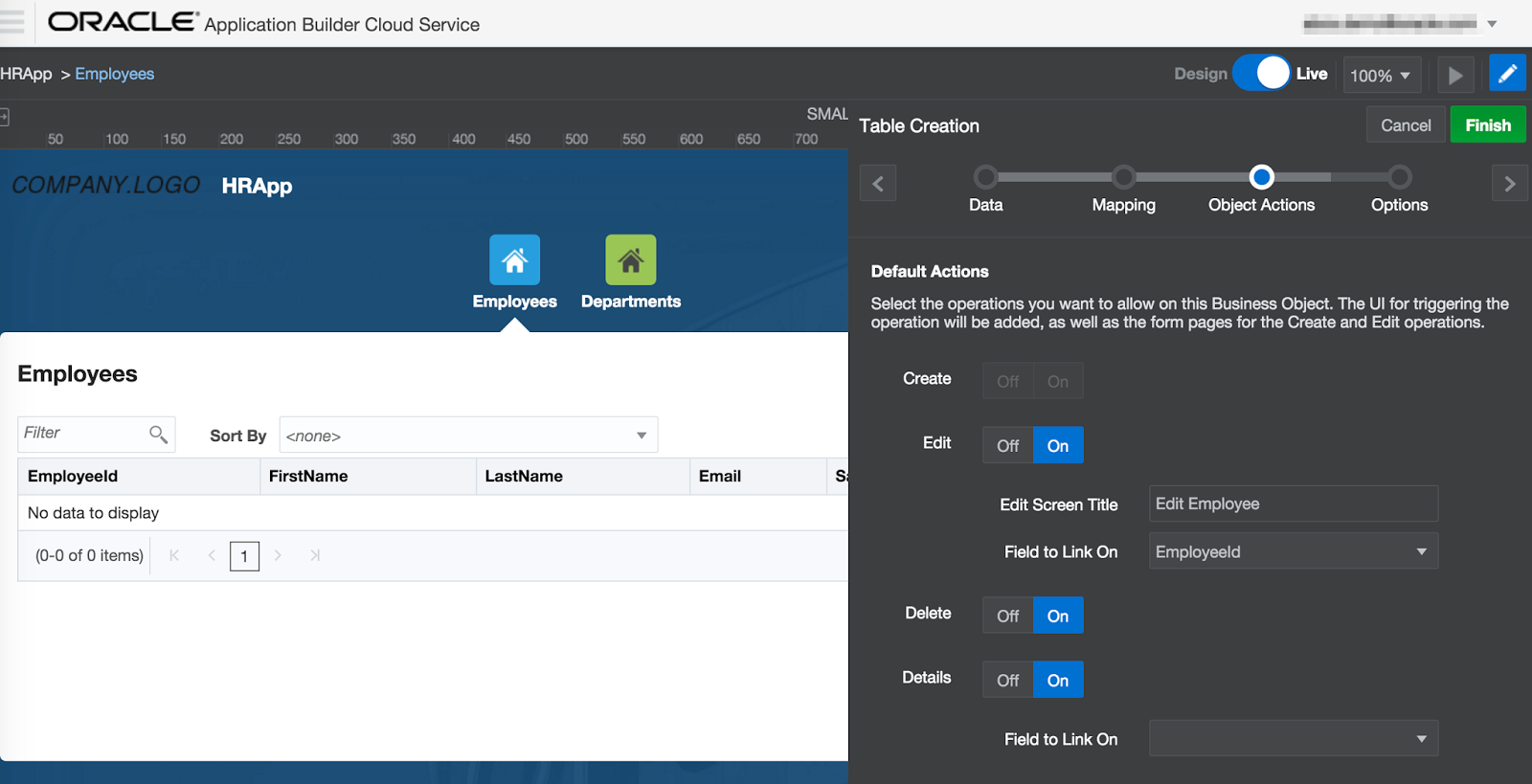
On the last wizard step you might want to configure Filtering, Sorting and further options like table summary for accessiblity.

Generated Edit form

As mentioned before when selecting to create the "Edit Action" ABCS generates the Edit form for you that you can further fine tune in terms of required fields, label positions, etc.


Conclusion

Oracle Application Builder Cloud Service feels like ADF for the cloud era. Having APIs as your backend (not coercively a DB) you model Business Objects which are the basis to wire the desired UI components.

The development experience is very smooth for basic UI development. For more advanced UI Logic custom JavaScript is needed. For reusable components Oracle JET (see blogpost) comes into play. All you need is a browser.

The resulting applications are being deployed with a push of a button on Test and Production Cloud Environments. Awesome!

Get Connected with the Community (Oracle JET and ABCS)

Be part of the ABCS Community and follow the ABCS Youtube Channel. Go to https://cloud.oracle.com/ApplicationBuilder for a trial account to get started.

Further Information

Tuesday, February 9, 2016

ADF Spotlight: REST in ADF 12.2.1

In the recent ADF Spotlight Webconference I have given a presentation and live demo on some of the new REST features in ADF 12.2.1. The recording (in german) is on youtube: https://www.youtube.com/watch?v=SmrINlqVNPs

The new REST features (to create REST resources) are implemented on top of Application Module (WebServices > REST). Here you can choose a Root View Instance, assign it to a release version and further configure the defined REST resource in a new Overview Editor.

Following summarizes some of the new REST features in ADF:

Resource Versioning

Versioning is the first thing need to be configured before you can start creating REST resources. It is supported at the level of the adf-config.xml file. Here you can define different versions. Each version can be configured as  active, deprecated or desupported. To keep things simple I recommend to use same name for internal and release name.


Versions marked as desupported will reply with HTTP 500  and corresponding message. They will not serve any REST Data.


Versions marked as deprecated will work. If you invoke the URL for v2 metadata you will get information that there is a successor-version:


It implements the HATEOAS principle and therefore is very developer friendly.

Read, Create, Update, Delete Out-of-the-box

By default all REST HTTP Methods are exposed on a resource. GET for read, POST for Create, DELETE for Delete. To partially update a resource (only some attributes e.g.)  the PATCH method is exposed.  For PUT you need to provide all attributes (It will do kind of a replace).

Important: When working with the REST API it is important to set the Content-Type to application/vnd.oracle.adf.description+json otherwise there will be the following exception:

oracle.adf.internal.model.rest.core.exception.CannotParseContentException: The PayloadParser could not be found in the ResourceProcessingContext.

See the following Postman PATCH sample:

Pagination for collections by default

Having a REST collection ADF automatically exposes parameters for pagination. Just append limit und offset as URL parameters and your good to go. see next pic to get a feeling how the parameters affect the response:

Children and LOVs as sub-resource

This is also a pretty great feature. 

By a simple configuration child view object instance will be exposed a sub-resources.


Configured LOVs on specific attributes will by default be exposed as sub-resources too. See example in postman:

Attribute Shaping

By default all attributes of a View Object will be exposed in the REST resource. If you want to expose only a subset of the attributes you can define "Service Shapes" on the View Object

and use those to customize the REST resource (Tab: Attributes)


Security

Securing ADF REST Resources is quite powerful. It works just like with Pages / Taskflow Permission. You just need to run the ADF Security Wizard on the RESTWebService project.

More features

Canonical Link

The canonical link is used to link to a resource that represents the full representation (of REST resource). This can be an "internal" defined View Object or an external (by pointing to the corresponding) ADF Connection.

See details in the Dev Guide: How to expose canonical Resources

RowFinder Key

With RowFinder configuration it is possible to change the URL of a resource from e.g. /employees/100 to /employees/SKING

Expose Custom Methods in the ADF REST Resource

To be evaluated ;) The ADF Documentation is not very clear about that topic.


--
Sample Code: https://github.com/enpit/enpit.sample.adf1221.restsandbox

Further information


Monday, June 30, 2014

How to use the Deck component (ADF 12.1.3 New Feature)

With the arrival of ADF 12.1.3 many new features has been introduced. One of those features is the brand new deck ui component. In this blogpost I want to give an example on how to use that new component.

Use Case

The use case is quite simple. Arrange pictures of soccer players in a grid. Once clicked on a picture it is flipped. On the backside you can see more details for the given player. Clicking once again on the card it flips back and shows the picture again. Let's look at the result:
Now clicking on the first pic it flips (with an animated transition) and show details.

How to implement

To implement the described use case create a panelGridLayout first with the following properties

  • row: Fixed height
  • cell: Fixed width, halign="stretch" and valign="stretch"

Inside each cell place the new af:deck component with two links as child components and two transition operations.
The commandLinks act as clickable cards on the deck. Each transition operation defines the desired animation when transitioning from one card to another. There are a lot of out-of-the-box transitions available as you can see in the screenshot.
Which card is currently displayed on the deck is controlled by the displayedChild attribute. It expects the component id of the given child ui component (in this case the af:commandLinks). The interesting piece of JSF Code for the sample to work is as follows:

To make the sample complete a backing bean is needed to handle the action events on each command link. Main task of the action listeners is to change the displayedChild attribut on the deck component and repaint it on the client (through a partial refresh)
While implementing the deck sample I did not want to use the deprecated af:commandLink. But converting it to af:link implies a JSF compilation error. So I switched back to the deprecated component.

Looks like the new Link Component is not fully compatible. Is this a bug?

Further Information