Showing posts with label oracle database cloud. Show all posts

Saturday, December 1, 2012

Deploying Database Objects to Oracle Cloud using JDeveloper


As announced in my previous post I am going to show now how to deploy Database Objects from a "local" Database to the Oracle Database Cloud. For that showcase I am using the following environment

Environment
  • JDeveloper (JDEVADF_11.1.1.6.0CLOUD_GENERIC_121118.1600.6229)
  • Oracle XE Database 11gR2 with HR schema
  • Oracle Database Cloud Service
Goal
The primary goal is to deploy the tables HR.DEPARTMENTS and HR.EMPLOYEES into the Cloud Schema. So in a next step it will be possible to build an Apex or an ADF Application associated to these tables in the cloud.

Prepare DB Deployment
In order to use the tools provided in JDeveloper for seamless deployment of DB objects into the Oracle Cloud start JDeveloper and open the Database Navigator (View > Database > Database Navigator)

Now create an IDE DB connection to the desired database. I am using the well known HR schema on an Oracle XE DB. This is really straight forward. Just click "+" and add a Database Connection by providing the appropriate account details. Double Click on the created node connects to the database and explores its contents.


Next we need to connect to the Oracle Cloud Database Service. That is pretty simple too.

Enter your cloud service details


et voila, the cloud connection is established!
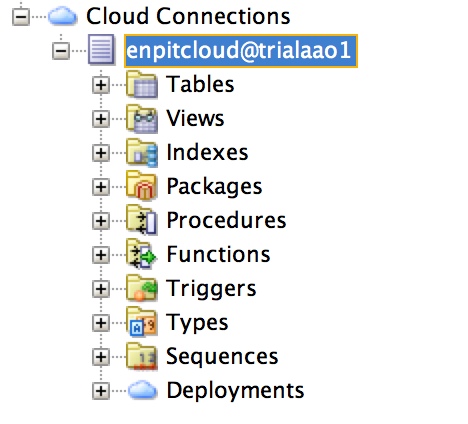

Important note: Before we go further let me explain the cloud connection details because this is really new and should be noted. The cloud connection actually has two channels. One for "read only" operations and another for DDL, and any SQLPlus scripts. That second channel works technically through SFTP and logically through the "Database Cart" where every db object or script is bundled into a ZIP for sending out to the cloud. Therefor you have to provide that information in the cloud connection wizard.

OK, so the last preparation step is to configure that "Database Cart". Goto: Tools > Preferences >Database > Utitlites > Cart > Cart Deploy and set the deploy directory according to you project needs.


Deploy DB Objects to the Cloud
After establishing the connections and configuring the Database Cart we are ready for deployment. Open Database Cart (View > Database > Database Cart) and Drag and Drop the DB Objects you want to deploy into the database cart.
Next: Click on Save

Click on Apply. 

The selected db objects (metadata) will be saved as an XML File. The Database Cart File contains Metadata about the database objects you want to deploy. To have a better understanding: it looks like that


It is kind of configuration file for the deployment of database objects into the oracle cloud.

Next Step is to deploy the selected DB objects + data into a ZIP file which afterwards will be used to transfer into Oracle Database Cloud.


The ZIP contains the corresponding scripts in order to deploy the objects and data some where else (cloud). Actually it contains a bunch of SQL scripts:


Now the last part is to deploy that ZIP file to Oracle Cloud.

Press Apply.

The data now is exported and transferred as a Deployment Unit on your Database Cloud Service.
You can verify your deployment by refreshing the cloud connection in JDeveloper

and also look into the processing log


The newly created Table DEPARTMENTS can be verified/viewed right from JDevelopers Cloud Connection


Once again - How does it work?
The chosen DB Objects + Data are exported from a database and put together in a deploy.zip file. By providing the SFTP DB Service Account details this file is transferred to the cloud through SFTP. You can verify this by logging into your SFTP Account:


To summarize
  • Configure Database Cart
  • Drag and Drop DB Objects into Database Cart
  • Deploy into Cloud
  • Verify Processing through Deployment Status/ Log
  • Verify deployed DB Objects through Cloud Connection right from the JDeveloper IDE
Having performed this steps next it is possible to build 
  • Apex Application
  • ADF / Java EE Application
  • RESTful Services
based on the deployed data structure. Stay tuned.

I really like that everything is bundled inside JDeveloper. No need to download any plugins or extra tools. Use JDeveloper to Build, Deploy DB and Java Applications (as I will show in the next post). Cool stuff! Goto cloud.oracle.com and try yourself!

Related Posts / Documentation


Friday, November 30, 2012

Oracle Java and Database Cloud Services in Action


Yesterday the long awaited  Oracle Cloud became reality (at least for me)! Thanks Oracle! Of course I could not wait any longer and had to do a test drive with the Oracle Database and Java Cloud Services. In order to start we need the following

Getting started
Once you confirm your activation link for the trial request you will receive an email with Service Details for
  • Identity Domain (which actually is a logical group for associated Users and Cloud Services)
  • Oracle Database Cloud Service
  • Oracle Java Cloud Service
  • Domain FTPs Account Details
In the mail there also will be a temporary password which must be changed after first login at the Identity Console. One thing really overwhelmed me is the fact that for every service you get dedicated user credentials. So there is a lot of stuff that is to be handled.

Identity Domain / Console
The Identity Domain actually is a logical group for associated Users and Cloud Services that is managed by the Identity Domain Administrator. The Identity Console is a web based application for 
  • Manage  User Profile
  • Create / Delete Users, Reset Passwords
  • Create / Delete Roles, Assign to Users
The Identiy Console is build with ADF. It looks like that


Oracle Database Cloud Service 
The Oracle Database Cloud Service runs Oracle DB 11gR2 and is managed by Apex 4.1.1.00.23. So logically no ADF here. Imagine you are running Oracle XE. Same here.

RESTful Services (by Application Express Listener)
RESTful services are created inside Apex and are delivered right from the Database through the Apex Listener

The defined RESTful Services can be tested right from the browser:

As you can imagine this allows pretty rapid development of RESTful Services! Beside JSON, CSV Format is supported. No XML!


As a sample DB application the following Apex App is installed and by default to demo key features of Oracle Apex! Further Apex applications can be easily deployed from the apex Workspace.


DB Export
In order to export Database strucure + data it is possible to trigger a data pump job with a single Mouse Click. After the job is completed the Dumpfile can be grabbed through SFTP from the /download user directory. The created files are automatically cleaned up after about 2 days. So do not try to archive your data here.


My test worked well without any trouble! The download speed was acceptable to although I did not download Gigs of data.


Access DB Schema
Now let us come to the  interesting part. How can we access the DB Schema from - e.g. SQLDeveloper or JDeveloper. In this case I will demo it from the new JDeveloper 11.1.1.6 (Build 6229) 

In order to access the Database Cloud service from the IDE we need a so called "Cloud Connection User" to be created in the database service console (Apex) with the SQL Developer Group as stated in the JDeveloper context help. This can can be easily done through the Apex Admin Tools (Manage users and groups). I won't go into further details here.

Now it is possible to create the connection from JDeveloper/SQLDeveloper

Enter your service details


and we are up and running, being able to see the structure and contents of the cloud database instance. 

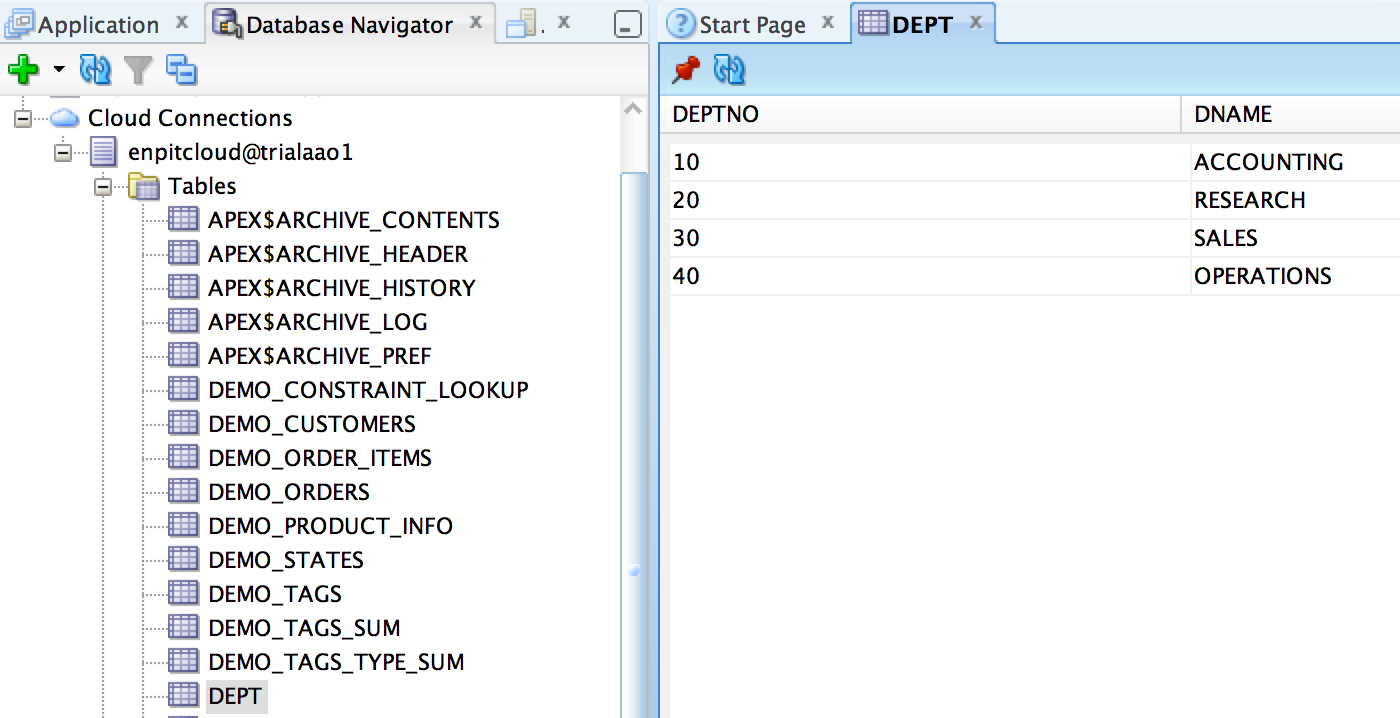
Access for example the table 'DEPT' and browse the data.
(The Tables EMP and DEPT are included in the cloud db schema)

The interesting part here is that it is not possible to change any database objects.

Deploying DB Objects is only possible through the newly introduced "Database Cart" which is accessible from "View > Database > Database Cart". 

That is a very new concept which needs a separate focus. More on that in a follow up post (Deploying Database Objects to Oracle Cloud using JDeveloper). Follow me on twitter to get updated in time (@multikoop)

Oracle Java Cloud Service Control
To monitor, deploy/undeploy start/stop Java and ADF Applications. It looks pretty simple and easy to use: Performance, Data Sources, Applications. Everything you need to get started.

This control is a subset of Oracle Enterprise Manager Cloud Control 12cR2 (12.1.0.2) as you can see in the about page.

In one of the next posts I am going to show how to "Deploying ADF Applications into the Oracle Cloud". Stay tuned.

Conclusion

In its current stage Oracle Cloud is promising Cloud Foundation for PaaS and SaaS. It includes
  • Identity Management / WebBased Identity Console (ADF Application)
  • Java Cloud Service Control to Monitor and Deploy your Java Applications (ADF Application)
  • Apex Control to Administer and Monitor Apex DB Applications and Cloud Connection Users
  • IDE Integration in JDeveloper 11.1.1.6 (Build 6229)
  • Oracle Cloud Java SDK Command Line Interface
  • IDE Integration in Oracle Enterprise Pack for Eclipse.
  • IDE Integration in Netbeans is on its way....
References

Start your cloud experience now! Goto http://cloud.oracle.com