Checkout my new post on Oracle Container Cloud Service!
Showing posts with label oracle cloud. Show all posts
Showing posts with label oracle cloud. Show all posts
Monday, November 28, 2016

Monday, March 28, 2016
Running Node.JS Apps and "Fat-JAR" Apps on Application Container Cloud Service
With the trend of container technologies going on it is great to see Oracle is providing the so called Application Container Cloud Service. Its current architecture is based on Docker and allows to run Java SE and Node.js applications in its current version. See the the following diagram

The Load Balancing, dockerizing and scaling is fully transparent. From developer perspective you are deploying a ZIP containing a manifest.json with a command property that states what should be executed once the deployment has been installed on the specific container.
In the following figure you see the overview screen of Application Container Cloud service (ACC).

In the following figure you see the overview screen of Application Container Cloud service (ACC).

Next lets create an app and deploy it to ACC. For Java SE lets see how that manifest.json looks like
Java SE App

The important properties are runtime / majorVersion and command. It states that the deployment needs Java 8. The application is started with the given "java -jar ..." command. Currently two working samples are provided, one works with embedded Tomcat the other works with Grizzly Http Server. Here is how a typical Main.java class would look like

The PORT and HOSTNAME are given from the environment. So it is in control of the application container cloud service.
Node.js App
For a Node.js app that manifest.json looks like

Node.js App
For a Node.js app that manifest.json looks like

It expects a file server.js as the main entry point. There is an official Node.js sample application (together with a Tutorial). In my example I am going to create a connection to Oracle Database Cloud Service (via oracle nodedb driver) and expose DEPARTMENTS as a read online REST Resource.
The most interesting part here is how to retrieve the CONNECT String to the Database.

For testing on local machine defaults are used. Once deployed the CONNECT String is given as an environment property (beyond PORT, USER, etc).
Hint: All the JavaScript modules except native add-ons like node-oracledb should be included in the ZIP bundle.
Deployment
The deployment is quite straightforward from the ACC UI using the "upload application archive" option. Further you can provide initial values for number of "Instances" and Memory.

After about 5 min. the application is available through the Load balancer. For automated deployment a REST API exists.
To connect to other cloud services a service binding needs to be created first. The service binding creates environment variables that are available to every application instance.

Custom environment variables can be created. For example the schema user / password you want to connect with. Unfortunately just clear text values are accepted at the moment. Would be great to have a "secret type" for passwords. Further # characters are not allowed (although my schema name is c##hr ;) ). Anyway it is no major show stopper.

See the sample service running in Postman

Logging / Diagnostics
Logs are stored on the Oracle Storage Cloud Service as a zip file. To look into the log files you have to download those ZIP files on your local disc first

For Java SE Apps a Flight Recording is possible.
The most interesting part here is how to retrieve the CONNECT String to the Database.

For testing on local machine defaults are used. Once deployed the CONNECT String is given as an environment property (beyond PORT, USER, etc).
Hint: All the JavaScript modules except native add-ons like node-oracledb should be included in the ZIP bundle.
Deployment
The deployment is quite straightforward from the ACC UI using the "upload application archive" option. Further you can provide initial values for number of "Instances" and Memory.

After about 5 min. the application is available through the Load balancer. For automated deployment a REST API exists.
To connect to other cloud services a service binding needs to be created first. The service binding creates environment variables that are available to every application instance.

Custom environment variables can be created. For example the schema user / password you want to connect with. Unfortunately just clear text values are accepted at the moment. Would be great to have a "secret type" for passwords. Further # characters are not allowed (although my schema name is c##hr ;) ). Anyway it is no major show stopper.

See the sample service running in Postman

Logging / Diagnostics
Logs are stored on the Oracle Storage Cloud Service as a zip file. To look into the log files you have to download those ZIP files on your local disc first

For Java SE Apps a Flight Recording is possible.
Summary
The first public release of ACC looks quite promising. For the next versions my wishlist would contain
- Online Log Viewer
- Monitoring RAM / CPU Usage / Requests online
- Automatic Scaling
- Service discovery
- Security ?
- Adding environment variables of type "secret". (Currently you can only provide variables in clear text)
- Packaging improvements, maybe some mvn acc:install or CLI Tooling
Looking forward to new features in the future versions. There is potential for a modern microservice platform.
Samples Code
Explore the Node.JS sample code on https://github.com/enpit/enpit.sample.acc-node-hrapi
The Java SE jersey based code is available from Oracle.
The first public release of ACC looks quite promising. For the next versions my wishlist would contain
- Online Log Viewer
- Monitoring RAM / CPU Usage / Requests online
- Automatic Scaling
- Service discovery
- Security ?
- Adding environment variables of type "secret". (Currently you can only provide variables in clear text)
- Packaging improvements, maybe some mvn acc:install or CLI Tooling
Looking forward to new features in the future versions. There is potential for a modern microservice platform.
Samples Code
Explore the Node.JS sample code on https://github.com/enpit/enpit.sample.acc-node-hrapi
The Java SE jersey based code is available from Oracle.
Further Information
Thursday, July 23, 2015
Getting Started with Oracle Mobile Cloud Service (MCS)
Mobile Application Development is often reduced to the tasks needed for implementing an app using some mobile framework like iOS, Android, Oracle MAF or some other hybrid framework. In reality there is a lot more work to do for making a mobile to work: manage user access, creating services, handle push notifications, monitor usage, etc etc.
Oracle Mobile Cloud Service (MCS) provides a central cloud service for developing, deploying, maintaining, monitoring, and analyzing your mobile apps. From the architecture perspective it looks like the following

To get started check out the MCS Introduction video from the Oracle Mobile Youtube Channel.
In the next posts I am going to show some of the features and how to work with Oracle Mobile Cloud Service. Stay tuned!
To get started smoothly I have put together the most useful content around Mobile Cloud Service.
Useful Learning Resources
Documentation
Tutorial
Oracle Mobile Cloud Service (MCS) provides a central cloud service for developing, deploying, maintaining, monitoring, and analyzing your mobile apps. From the architecture perspective it looks like the following

To get started check out the MCS Introduction video from the Oracle Mobile Youtube Channel.
In the next posts I am going to show some of the features and how to work with Oracle Mobile Cloud Service. Stay tuned!
To get started smoothly I have put together the most useful content around Mobile Cloud Service.
Useful Learning Resources
Documentation
Tutorial
Tuesday, April 21, 2015
Java Cloud Service Webcast on April 24th 2015
 |
| [Source: Oracle] |
Schedule: April 24th 2015 15:00-16:00 CET (Berlin time)
Presenters: Cosmin Tudor and Jürgen Kress
Registration: register here
In this webcast Cosmin & Jürgen will provide both an overview presentation and a short demo that will cover the new Oracle Java Cloud Services - Platform as a Service offerings and the integration with other Oracle Cloud offerings like: Developer Cloud Services, Database Cloud Services, Documents Cloud Services ...
In about 1 hour the following topics will be covered:
- Java Cloud Services:
- Java Cloud Services PaaS and PaaS – Virtual Image
- Java Cloud Services SaaS Extensions
- Management and Administration:
- Provisioning
- Backup and Recovery
- Patching
- Scaling
- REST API
- Coherence Cloud Services
- Storage Cloud Services
- Compute Cloud Services
- Developer Cloud Services
- Database Cloud Services
Looking forward to it! Hope to see you in the webcast!
Sunday, March 8, 2015
#ofmForum 2015 in Budapest has rocked!
Last week I attended the Oracle Fusion Middleware Partner Community Forum 2015 in Budapest. Over 150 participants from Europe, US and even Latin America (Peru, Costa Rica, Mexico, Venezuela) joined the great event where various Oracle Product Managers and Oracle Partners exchanged their experiences with the community. Jürgen Kress - well known from his soacommunity & weblogiccommunity blogs - and his team hosted a great event at a great location! Thanks a lot!


Oracles answer to these requirements are the upcoming Cloud Services
The Digital Transformation is just starting
We got an update about Oracles overall cloud & mobile strategy that drives the digital transformation. Nowadays there is a huge demand on business agility due to disruptive technologies and market shifts.Oracles answer to these requirements are the upcoming Cloud Services
- Integration Cloud Service (ICS)
- Process Cloud Service (PCS)
- Mobile Cloud Service (MCS)
and SaaS solutions running on Oracles PaaS (Database Cloud Service, Java Cloud Service). The main focus for the upcoming releases for Oracle SOA/BPM/ACM 12c is on stability & improvements.
The nice thing about the ofmForum is that there wasn't just slides but on the most products real working demos. On day 2 there were 3 parallel tracks dedicated for SOA, BPM/ACM and WebLogic&Mobile. The experts gave demos on API Catalog, API Manager, StreamExplorer, Event Processing, Mobile Alta UI & OSB Integration for SOAP to REST transformations, MAF, ICS, PCS, MCS and the Java Cloud Service (JCS) plus Developer Cloud Service. Really a lot of new acronyms to learn ;)
Day 3/4 was dedicated to 4 parallel Workshops with a lot of hands-on sessions. (SOA, BPM/ACM, Mobile Application Framework (MAF), Multichannel Enablement). I attended the Multichannel workshop. Based on an existing SOAP-Webservice we used OSB 12c to transform it (without coding) to a REST JSON based service. On top of that we built a mobile app with MAF. In the end I had a running MAF application on my real iOS device.
Networking & Get-together
Besides the cool and new technologies there were a lot of chances to network and get in touch with Oracle Product Managers and Partners. I enjoyed it a lot meeting persons I only knew from twitter or blogs. Thanks for all the great conversations! Further, Budapest is an amazing city! Good food, wine & bars and historical locations. Thanks Jürgen and Oracle for the nice dinner in the spoon restaurant. And if you are in Budapest check out the Simpla Kertmozi, a pretty cool "ruin bar":)
I am really looking forward for the next OFM Forum 2016. Which location will be next?
Further information
See more cool pictures of the event in the twitter stream #ofmForum
Sunday, November 16, 2014
Create RESTful Services and deploy to Oracle Java Cloud Service with Netbeans
In preparation to one of my DOAG 2014 talks „Java WebApps and Services in Oracle Cloud" I created a new trial account for Oracle Java Cloud Service (http://cloud.oracle.com) two weeks ago. Now was the time to create a RESTful Service and deploy it to the cloud and make it accessible to public.
Last time I tried the Oracle Cloud I used exclusively JDeveloper, this time I made my experience with Netbeans. From my point of view Netbeans has pretty good support for generating RESTService from Database tables. In a couple of minutes it is possible to create CRUD Operations and make it accesible by a REST endpoint. No matter what content type you prefer, by using JAXB XML and JSON content types are both automatically available.
Step 1: Create an Oracle Java Cloud Service trial account (fee less for 30 days)
Step 2: Download and install Netbeans Version 8.01 (http://www.netbeans.org)


Step 3: Make sure to install the Oracle Cloud plugin (1.5) in Netbeans
Step 4: Download and Install (just unpack) Oracle Java Cloud Service - Saas Extension SDK (release 14.1.12.0 Find it here: http://www.oracle.com/technetwork/middleware/weblogic/downloads/java-cloud-sdk-1848874.html)
Step 5: Next add your Oracle Cloud account as Cloud Provider to Netbeans (Goto „Services" Tab and provide your cloud account details)
Step 6: Add a WebLogic Service Instance under ‚Services Tab', so you are able to test the RESTService locally prior to deploying to Oracle Cloud. (I am not going into detail in this post for that task)
Step 7: Make sure to deploy your DB Schema objects plus data into Oracle Database Cloud Service (when subscribing to Java Cloud Service you will get the DB Service as well). See in my previous posts for more details.
HowTo develop RESTService with Netbeans
Everything is setup for cloud deployment. Now let's create a simple REST-Service on top of the HR DB Tables EMPLOYEES and DEPARTMENTS.
Step 1: Start Netbeans, Create new Project Wizard from Type „Maven / Web Application"
Step 2: Enter your desired groupId, ArtefactId etc.
Step 3: Choose Oracle WebLogic as ‚Server' and Java EE Version 5.
Click Finish.
Step 3: Start „RESTFul Services from Database" Wizard
Step 4: Make a connection to your local database and select the desired Tables.
Step 5: Review and adapt Package-Settings if desired
Next:
Confirm your input and let Netbeans generate the source code. If you like you can make some adjustments to the generated code. Typically I would change the REST resource path. (in my sample: to „employees")
Step 6: In order beeing deployable to Oracle Cloud we need to make further some adjustments. That
is
Adjustment 1: web.xml
(1) We need to change the servlet class from org.glassfish.jersey.servlet.ServletContainer to com.sun.jersey.spi.container.servlet.ServletContainer because the prior class is not available on the cloud server. (2) Further add an <login-config /> if you want to make the Service publicly (without authentication) available.
Adjustment 2: weblogic.xml
Add a library reference to jax-rs 1.1
Adjustment 3: persistence.xml
Configure your Cloud DB Service name as JNDI Data Source
Deploy RESTService to the cloud
Step 1: Open Project Properties, Choose ‚Oracle Cloud Remote" Server Type, Java EE Version 5
Step 2: Execute ‚Run'
The cloud deployment will start...
The WAR file will be virus scanned...
And Finally deployed to the cloud.
Test the cloud RESTService
Here is my REST Service url for departments https://jcssaasextensitrial9655-deenpitconsultrial83769.java.us2.oraclecloudapps.com/HRRestService/webresources/departments
If using Chrome install the Postman extension to test the Service. e.g. to test different content types. JSON, XML
….

Administer Oracle Java Cloud Service from within Netbeans
Right under the Service Tab your able to Open the Apps, Start, Stop or Undeploy.

To view the Job Status and Logs open the corresponding view from the Oracle Cloud entry.

Troubleshooting
If something goes wrong open the Cloud Job View and Logs Tab to check the details, e.g. if a deployment fails. (1) ClassNotFound Exception
Solution in that particular case is: Use com.sun.jersey.spi.container.servlet.ServletContainer instead of org.glassfish.jersey.servlet.ServletContainer.
(2) java.lang.AbstractMethodError: javax.ws.rs.core.UriBuilder.uri(Ljava/lang/String;)Ljavax/ws/rs/core/UriBuilder
Solution: Somehow the generated POM had a fixed reference to JAX-RS Library which is provided from the cloud server. So I changed that dependency

Conclusion
- Having everything setup (Cloud SDK, local WebLogic Servece, DB Objects in the Cloud Service) it is quite easy to build and deploy RESTful services.
- Why is the SDK not bundled with the Netbeans Oracle Cloud Plugin?
- I wish there would be that kind of wizard (RESTful Services from Database) for JDeveloper ;)
- I wish there would be that kind of wizard (RESTful Services from Database) for JDeveloper ;)
Download Sample: enpit.training.cloud.hrservice-netbeans801.zip
Further Information
- http://www.oracle.com/webfolder/technetwork/tutorials/obe/java/JCS-JAXRS/jcs_jaxrs.html (Tutorial)
- See also: http://www.oracle.com/technetwork/articles/java/enterprise-cloud-2227135.html (Build with NetBeans IDE, Deploy to Oracle Java Cloud Service)
Sunday, December 30, 2012
Managing ADF Applications with Oracle Java Cloud Service Control
In this post I am going to show how to manage and monitor Oracle ADF Applications in the Oracle Cloud using Oracle Java Cloud Service Control.
Prerequisites
You should have the following done before trying the described steps in this post yourself.
- Having a (trial) Oracle Cloud Java Service (which includes the database cloud service as well)
- Having deployed an ADF Application to Oracle Cloud as described in the previous post (http://multikoop.blogspot.de/2012/12/deploying-adf-applications-into-oracle.html)
The Oracle Java Cloud Service Control - that's the official name - is a subset of Enterprise Manager Cloud Control 12.1.0.2.0. It supports the Cloud Service Administrator to do the following tasks:
- View the list of services, metrics and availability of each service instance
- Deploy / Undeploy / Start / Stop Java EE (ADF) applications
- View cloud service job logs to see and verify recent activity
- View and export application log messages
- View ADF Application performance metrics <<< "does not work for me"
Getting started, Monitor Service Metrics
To get started log in at cloud.oracle.com and open "My Services" tab.

On this screen the first interesting metrics can be monitored per Java service instance.
- Java Heap usage, averaged over the last 15 minutes
- CPU usage, averaged over the last 15 minutes
From the service overview we can follow the 'Service Console' Icon that will take us to the 'Oracle Cloud Java Service Control'

The dashboard mainly shows an overview of the service availability and some common used resource usage metrics in different representations (diagram, table) like
- Active HTTP Sessions
- Request processing time (in ms)
- Request count (per minute)
- Open JDBC Connections
- Java Heap Usage
- CPU Usage
Deploy / Undeploy / Start / Stop Java EE (ADF) applications
The next important part is the possibility to Deploy, Undeploy (Delete), Redeploy, Start & Stop Applications. These are common administration tasks which are easy to use without any complications - at least start, stop worked fine so far ;).
For this post I am going to try deployment of ADF App right from the browser. Let's see if it works (The first ADF Deployment into the Oracle Cloud I have done from JDeveloper IDE, which worked without any problems). So let's click 'Deploy New'

Choose an EAR from you local machine, give the child a name and press 'Deploy'.

The upload goes really quick and user is provided with a message which says that a cloud service Job has been started in order to perform the task.

Lesson learned: It is not possible to provide a deployment plan while deploying ADF Applications in the Oracle Cloud.
This brings us to the next feature.
Cloud service job logs
On the bottom of the cloud control dashboard there is a table panel 'Java Cloud Service Jobs' to track the recent activity. After refreshing the dashboard we notice that the previously started deployment job has failed.

Select the corresponding row and open the 'View Java Cloud Service Job Logs' Menu

The strange thing here (bad UX) is that the service administrator has to guess what actually caused the deployment to fail from 3 options
- The uploaded EAR might have not passed the virus scan
- The uploaded ADF Application might have not passed the whitelist validation
- The deployment failed due to some other issue.
a) For every option you choose from the Menu a file is downloaded and can be viewed on the local machine.

Virus Scan: Passed successful.
b) Next: Application Whitelist Validation
2012-12-29 16:41:23 CST: Starting action "API Whitelist"
2012-12-29 16:41:23 CST: API Whitelist started
2012-12-29 16:41:24 CST: WARNING - There are 2 warnings(s) found for enpit_cloudapp2.ear.
2012-12-29 16:41:24 CST: WARNING - Path:enpit_cloudapp2.ear (2 Warnings)
2012-12-29 16:41:24 CST: WARNING - Path:enpit_cloudapp2.ear (2 Warnings)
2012-12-29 16:41:24 CST: WARNING - Path:enpit_cloudapp2.war (2 Warnings)
2012-12-29 16:41:24 CST: WARNING - Path:WEB-INF**** (2 Warnings)
2012-12-29 16:41:24 CST: WARNING - 1:Recommended child element "jsp-descriptor" missing under element /
bea-weblogic:weblogic-web-app.
If you have a JSP file that is not pre-compiled, The compilation errors
could be shown on the browser. It is recommended to include
<jsp-descriptor><verbose>false<****><****-descriptor> in weblogic.xml.
Line No:2.
2012-12-29 16:41:24 CST: WARNING - 2:Recommended child element "session-descriptor" missing under element /
bea-weblogic:weblogic-web-app.
You will be required to have distinct cookie-path, if multiple
applications are accessed with in the same SSO session or if you have
multiple applications with different auth-method(CLIENT-CERT, FORM, BASIC)
in the same service instance.
Line No:2.
2012-12-29 16:41:24 CST: WARNING - enpit_cloudapp2.ear had 2 warning(s).
2012-12-29 16:41:24 CST: INFO - Whitelist validation has completed with 0 error(s) and 2 warning(s).
2012-12-29 16:41:24 CST: Whitelist validation passed.
2012-12-29 16:41:24 CST: "API Whitelist" complete: status SUCCESS
c) Looks like the deployment actually went wrong - and indeed
2012-12-29 16:41:24 CST: Starting action "Deploy Application"
2012-12-29 16:41:24 CST: Deploy Application started
2012-12-29 16:41:40 CST: weblogic.application.ModuleException:
2012-12-29 16:41:40 CST: WLS action state: failed
2012-12-29 16:41:40 CST: Action FAILED with WLS state: failed
2012-12-29 16:41:40 CST: Application deployment failed.
2012-12-29 16:41:42 CST: [Deployer:149034]An exception occurred for task [Deployer:149026]remove application enpit_cloudapp2 on c1.: .
2012-12-29 16:41:42 CST: WLS action state: completed
2012-12-29 16:41:42 CST: "Deploy Application" complete: status FAILED
=> Well so it looks like an exception occurred while 'removing the application on c1". This message does not help really much, is confusing since that was the first deployment and no need for removing a previous application.
Application log messages
Maybe the log messages give some more information about the failure. The messages are accessible by following the link 'View Log Messages'

Looks like there is a configuration exception in the deployed ADF Application. After deploying the same application from JDeveloper into the Cloud I have noticed the Deployment Platform in the Log was 'Oracle Cloud'. So the problem was clear to me. Open the Deployment Profile and adjust the platform to 'Oracle Cloud' for creating the EAR.

After creating the EAR once again with that setting and performing same steps from the Cloud Control as described above the deployment worked as expected.
Important lesson learned: The Deployment Profiles and so the resulting ADF Application EAR differs. You cannot use the same EAR for Deployment to on-premise WebLogic Server AND Oracle Cloud Java Service!
ADF Performance metrics
Clicking on a given ADF applications name shows a dedicated performance view

IMHO the displayed metrics cannot be realtime values because most of the testing time - there were 2 active HTTP sessions all values were displaying 0. So I guess it is an average view over the last 15 Minutes.
From the application menu the ADF Performance view can be opened.

This part is very disappointing for now since the displayed information is just not true!

The sample app is using an Application Module and so should also display application module pool stats as indicated (but empty :( )
Same to the TaskFlows view

Sample application is using two bounded task flows. So I would expect them to be shown up here.
Conclusion
In general the Java Cloud Service Control makes what it is made for. It looks like the observed shortcomings are a limitation to the trial account or the ADF Performance Summary does not work in its current state. It is interesting to see that even in the official Oracle Cloud Documentation (Sec. Monitoring Oracle Java Cloud Service) there is no word left about the ADF Performance Summary + all available screenshots show 0 sessions, 0 requests and so on.
If someone has a different experience or some guy from Oracle has an explanation for the inconsistent behavior in the Cloud Service Control feel free to comment. I would be happy to be convinced from the opposite - a reliable cloud service control for monitoring ADF Applications.
Enhancement Requests
- Java Cloud Service Jobs
- Emphasize failed jobs, e.g. displaying 'Failed' in Red.
- In case of failed jobs there should be made clear on first view what caused the issue (Virus detected, Whitelist violated, other issue).
- Error message in case of failed deployment should be more useful. An message like 'An exception occurred for task [Deployer:149026]remove application enpit_cloudapp2 on c1.: .' does not say anything about the cause.
- Resource Usage metrics (sessions, Request processing time, JDBC Connections)
- Realtime Values. Currently it looks like the values are most of the time 0 even if there is some load.
- ADF Performance
- Display the actual metric values. Currently AM Pool and Taskflow metrics are not shown.
- General: Improved Reliability. Sometime there were just errors and inconsistent information displayed (see next image). E.g. error getting datasources and open JDBC Connections = 0 but the DB based application was accessible and worked fine.

Documentation
- Oracle Cloud Documentation (Monitoring Oracle Java Cloud Service) http://docs.oracle.com/cloud/CSJSU/monitor.htm#CSJSU7070
Related Posts
- Deploying ADF Applications into Oracle Cloud using JDeveloper (by enpit) (http://multikoop.blogspot.de/2012/12/deploying-adf-applications-into-oracle.html)
- Deploying Database Objects to Oracle Cloud using JDeveloper (by enpit) (http://multikoop.blogspot.de/2012/12/deploying-database-objects-to-oracle.html)
- Oracle Cloud Java and Database Services in Action (by enpit) (http://multikoop.blogspot.de/2012/11/oracle-java-and-database-cloud-services.html)
Sunday, December 2, 2012
Deploying ADF Applications into the Oracle Cloud using JDeveloper
In this post I am going to show how to deploy Oracle ADF Applications into the Oracle Cloud using JDeveloper.
Prerequisites / Environment
You should have the following at your hands.
- JDeveloper (JDEVADF_11.1.1.6.0CLOUD_GENERIC_121118.1600.6229)
- Oracle Cloud Java Service (which includes the database cloud service as well)
- Oracle Database (HR Schema)
- Having deployed the DB Objects and Data (HR.EMPLOYEES and HR.DEPARTMENTS) as described in the previous post
Note: In its current stage Oracle Java Cloud Service runs WebLogic Server 10.3.6 with the appropriate Runtime ADF 11.1.1.6. Deployment of ADF 11gR2 Applications is currently not supported. Beside this limitation some ADF Features are not supported on the Oracle Cloud. According to the Oracle Cloud Documentation it is not supported to use the following ADF features
- ADF Desktop Integration
- ADF mBean
- ADF MDS (Seeded customizations or cross-session personalization)
- ADF Mobile
- ADF Active Data Services (=> No real-time ADF Web Apps in Oracles Cloud)
- ADF Business Components services interfaces (web services) or events
- ADF Data Controls for BI, Essbase, BAM, and JMX
Further there are some restrictions which are good to know I think
- No Java Mail API (=>Sending Mails is prohibited)
- No File system access by deployed applications (=>Writing files is prohibited)
- No Direct use of Oracle JDBC Driver APIs
- No Java Message Service (JMS)
- Max Size for deployment archive 95MB
I wonder what 'ADF Mobile' in that context actually means. Mobile Browser Apps? Or the restriction that ADF Mobile Client apps cannot make use of ADF BC SDOs? Maybe someone from Oracle could comment. That would be great. Thx!
Setup ADF Application
OK, let's do the actual work. In order to have shown the whole deployment procedure (database objects and ADF Application) we are going to create a basic ADF Application that is running against a non-cloud, on-premise database first using the well known DB schema HR - involving table EMPLOYEES and DEPARTMENTS. Remember that these table structure + data has been deployed to the Oracle Cloud Database before.
I have created Business Components for the desired tables and build a simple master-detail Page for Departments and Employees. To verify the app is functioning as expected run in on the integrated WebLogic Server prior to deploying to the Cloud:

Looks good so far.
Prepare ADF Application for Cloud Deployment
Since we want to make the ADF Application connect to the Oracle Cloud Database Service we need to make sure the applications does the right DataSource Lookup. Therefore we need the right JNDI-Name which is pretty easy to find out.
Open the Oracle Java Cloud Service Console : https://console.us1.cloud.oracle.com/em/faces/javaservice?serviceName=java&identityGroup=<identitydomain>
and take a look at the associated DataSource with your Java Cloud Service.

Now the remaining task is straight forward (at least for everyone who has configured ADF Applications in the past). Open the Application Module and adjust the default configuration accordingly. That means Connection Type = JDBC DataSource with the given name database.
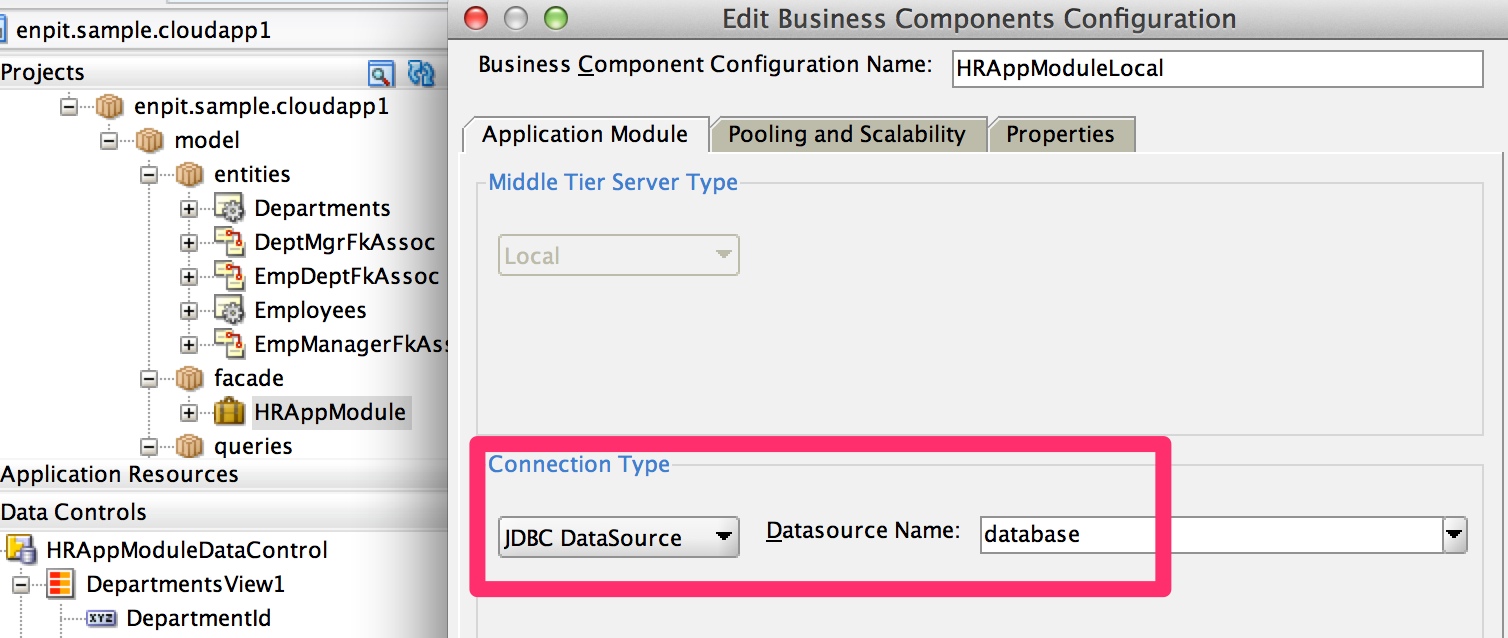
Note: If you want to a single configuration for on-premise and cloud just make sure to create a datasource bound to JNDI Name 'database' in your integrated WebLogic Server.
Make the ADF Application publicly accessible
By default all ADF Application deployed to Oracle Cloud will be automatically secured! When users access the application they will be redirected to authenticate against the associated identity domain. The login screen will look like that
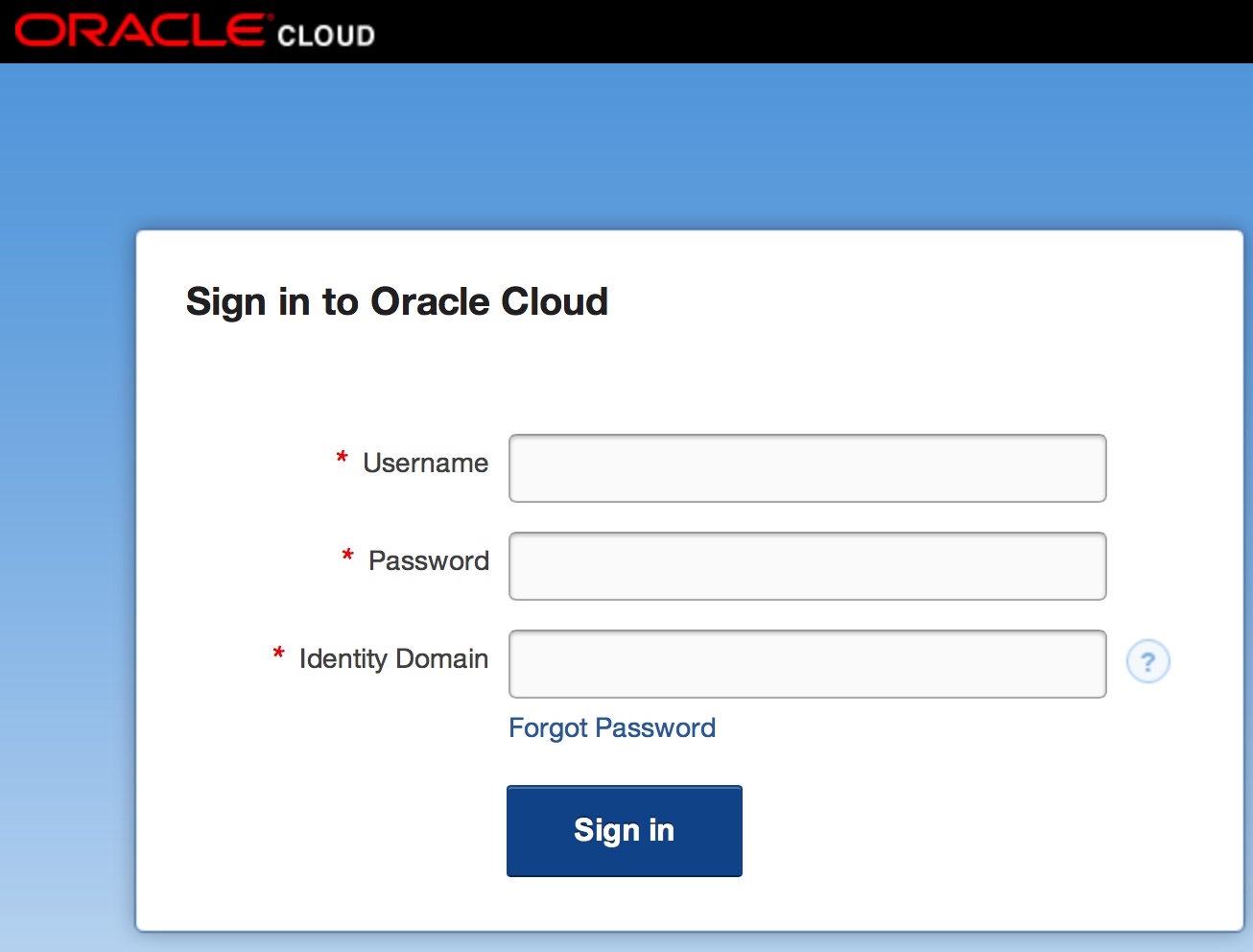
Since I want to make the ADF Application for everyone outside the identity domain accessible there is one simple configuration change in the web.xml descriptor needed.
Just add <login-config/> at the appropriate place and the app will be public.

That's easy. The application is now ready for the Cloud Deployment.
Deploy ADF Application to Oracle Cloud
Goto 'Application > Deploy > 'deployment profile name'

[Deployment Wizard opens]
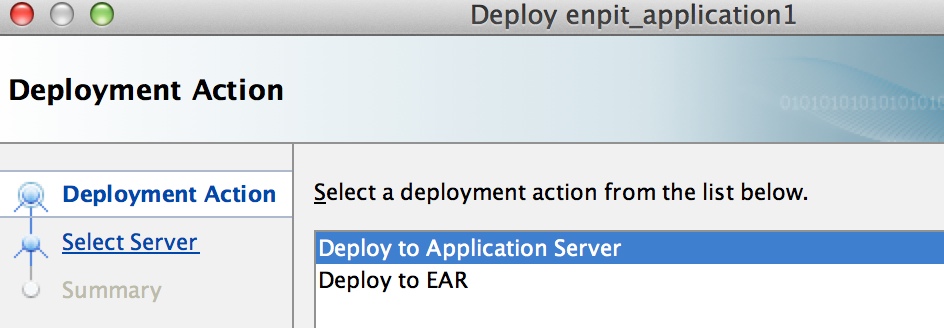
Select: Deploy to Application Server
Click: Next

Enter Connection Name: <some_conn_name>
Select Connection Type: Oracle Cloud
Click: Next

Enter Username: <Your Cloud Identity user name>
Enter Password: <Your password>
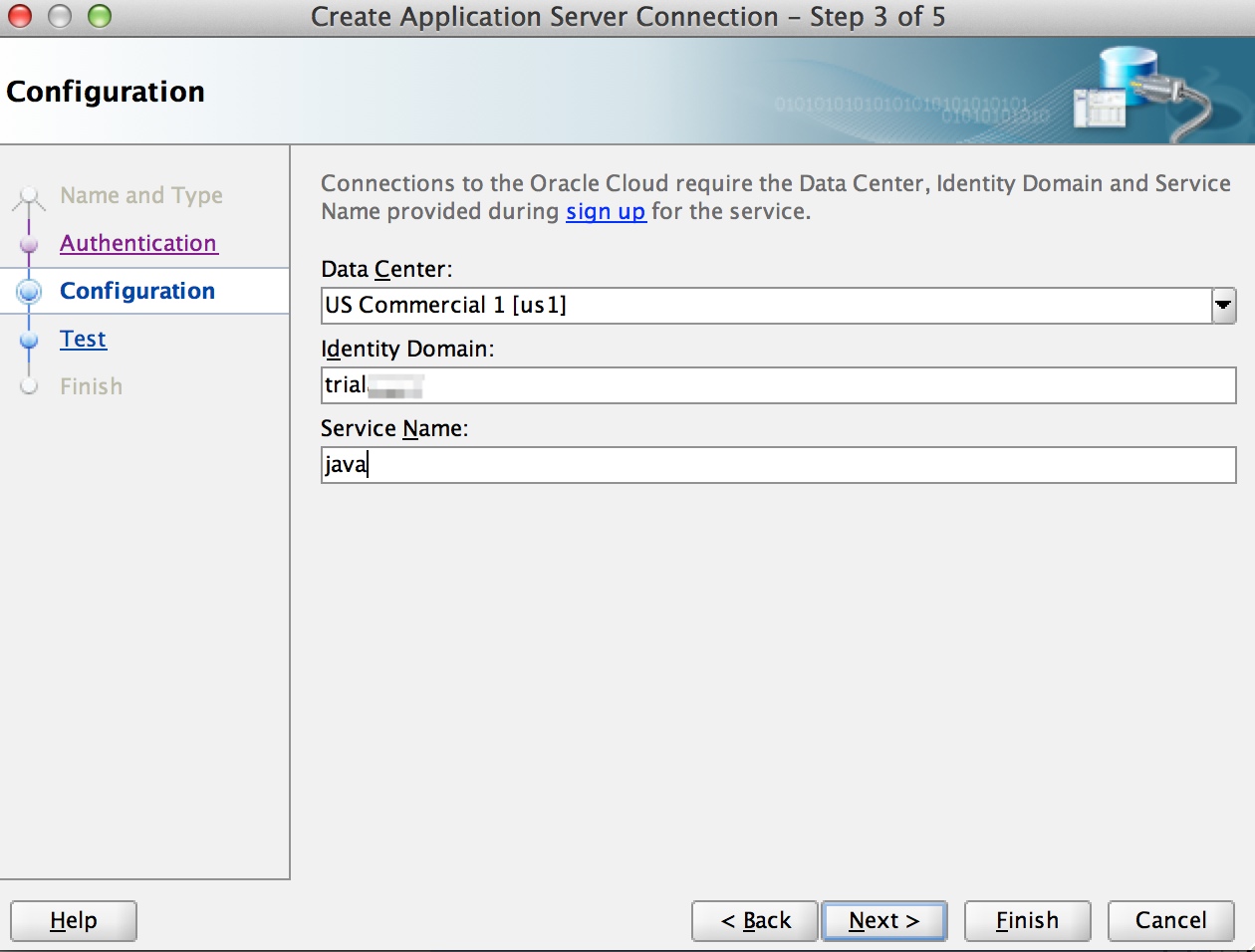
Select Data Center: <Data Center>
Enter Identity Domain: <Your identity domain name>
Service Name: <Your service name, by default it is java>
Click: Next
Test the cloud java connection

Click Next,
The ADF Deployment to the Cloud starts. Follow the processing in the Log window.

After less than 2 Minutes the ADF Application is available in the cloud.

Check it out yourself: https://java-trialaao1.java.us1.oraclecloudapps.com/enpit.sample.cloudapp1
(If it is not available chances are high my trial oracle cloud account is expired ;) )
Some words on redeployment: On redeployment from the JDeveloper IDE the previously deployed app version is undeployed first. The the new app version is deployed as expected.
Summary
- Deploy DB Objects if needed to Oracle Cloud Database
- Configure Application Module to use Connection Type JDBC DataSource, Name: database
- Add <login-config /> to your web.xml to make the ADF Application public if needed
- Setup up Oracle Cloud Application Server Connection
- Deploy ADF Application via Cloud Server Connection
Conclusion
Everything worked as designed so far. No failure / exceptions occurred to me. Thanks Oracle! Great Work!
Related Posts / Documentation
- Deploying Database Objects to Oracle Cloud using JDeveloper (by enpit) (http://multikoop.blogspot.de/2012/12/deploying-database-objects-to-oracle.html)
- Oracle Cloud Java and Database Services in Action (by enpit) (http://multikoop.blogspot.de/2012/11/oracle-java-and-database-cloud-services.html)
- Oracle Cloud Documentation (Developing Applications for Oracle Java Cloud Service) http://docs.oracle.com/cloud/CSJSU/dev_app.htm#CSJSU7037
- Oracle Cloud Documentation (Unsupported Features and APIs) http://docs.oracle.com/cloud/CSJSU/feat_implement.htm#CSJSU7042
- JDeveloper Download: http://www.oracle.com/technetwork/developer-tools/jdev/downloads/jdeveloper11116-1377208.html
Subscribe to:
Posts (Atom)