Today it is time to say "Thank you" to the Oracle Technology Network (OTN) for keeping up one of the worlds greatest developer community.
One cool thing within the Oracle Development ecosystem I really like is the availability of an technology agnostic Design Guide, including Style, Patterns, Cookbook, etc. called ALTA UI. Besides containing best practices for designing great User Experiences it allows to introduce new technologies under the covers. The user does not notice if something is build in ADF, JET, MAF or technology X which implements the Alta UI Patterns.
Source: altaui.com
Checkout some of the featured Alta UI Demos.
Checkout Alta UI Design Pattern Library.
#ThanksOTN
WebLogic, ADF, Mobile, JET, SOA, WebCenter, JDeveloper, Oracle Cloud
Showing posts with label oracle adf. Show all posts
Tuesday, October 11, 2016
Tuesday, November 3, 2015
Consume JSON based ADF REST Services in ADF 12.2.1 (with REST DataControl)
In ADF 12.2.1 the capabilities for handling with REST services has been greatly improved. You can now expose ADF BC (ViewObjects) as REST service in JSON format. On the other hand there are improvements in the REST DataControl.
In this blog post I am going to show how to consume this REST Service and create a basic ADF Table.
So here is a basic REST Service for employees
The create web service data control wizard launches. Choose REST option.
Next you can decide whether you consume a REST service, that has been exposed through ADF BC Application Module or a generic REST service. The difference here is that the ADF based REST service exposes additional meta data that describes the structure and types of the return JSON structure. This makes it possible to automatically get a type-aware DataControl on REST/JSON service which is generically not the case. See next screenshot to get a feel of the feature of an ADF REST Service and this particular describe feature.
So lets add an ADF REST Connection
Important note: Do include the version name and resource name, but do not include any URL parameters.
Next it is possible to choose from Security Policies
Since in this example we do not use any security just skip this page.
Next you can choose to add all resources or specific one. in this case I have only one resource exposed
Click Next and Finish.
=> The DataControl will be created. Every attribute type is correctly derived from the rest metadata (ADF REST service specific).
(Interesting to note, that EmployeeId is not marked as the primary key. Although it is in the ADF BC ViewObject definition from which the service has been previously created. Well it is because of the REST nature of this Collection. Resources typically must not match every attribute of an ADF ViewObject. It could be a subset. Therefore the canonical attribute represents the primary key which is typically the URL to the canonical resource. In our case the canonical resource is the resource itself :))
Next steps are as easy as with any other DataControl. Just create an ADF table via drag and drop
Run the page.
Table is displayed. Filtering works BTW too. Nice.
Since we are consuming an ADF REST Service lets see if we can update a record. Therefore Drag and Drop the „Commit“ Operation from the Data Control. Create a button and name it „Save changes“. For a simple testcase we change the salary from initially 10000 to 5000. Press „Save changes"
Looking into the database you will notice the change
Pretty cool.
Refreshing the page the table keeps empty (Not data to display). Looks like a bug. It would not surprise me. Anyone feel free to file a SR to Oracle.
Consumer: enpit.sample.adf1221.restconsumer.zip
16.3.1 How to Expose Canonical Resources in the ADF REST Resource
22 Consuming RESTful Web Services Using the ADF REST Framework
In this blog post I am going to show how to consume this REST Service and create a basic ADF Table.
So here is a basic REST Service for employees
REST DataControl with JSON Support
From „New Gallery“ open the following wizardThe create web service data control wizard launches. Choose REST option.
Next you can decide whether you consume a REST service, that has been exposed through ADF BC Application Module or a generic REST service. The difference here is that the ADF based REST service exposes additional meta data that describes the structure and types of the return JSON structure. This makes it possible to automatically get a type-aware DataControl on REST/JSON service which is generically not the case. See next screenshot to get a feel of the feature of an ADF REST Service and this particular describe feature.
So lets add an ADF REST Connection
Important note: Do include the version name and resource name, but do not include any URL parameters.
Next it is possible to choose from Security Policies
Since in this example we do not use any security just skip this page.
Next you can choose to add all resources or specific one. in this case I have only one resource exposed
Click Next and Finish.
=> The DataControl will be created. Every attribute type is correctly derived from the rest metadata (ADF REST service specific).
(Interesting to note, that EmployeeId is not marked as the primary key. Although it is in the ADF BC ViewObject definition from which the service has been previously created. Well it is because of the REST nature of this Collection. Resources typically must not match every attribute of an ADF ViewObject. It could be a subset. Therefore the canonical attribute represents the primary key which is typically the URL to the canonical resource. In our case the canonical resource is the resource itself :))
Next steps are as easy as with any other DataControl. Just create an ADF table via drag and drop
Run the page.
Table is displayed. Filtering works BTW too. Nice.
Since we are consuming an ADF REST Service lets see if we can update a record. Therefore Drag and Drop the „Commit“ Operation from the Data Control. Create a button and name it „Save changes“. For a simple testcase we change the salary from initially 10000 to 5000. Press „Save changes"
Looking into the database you will notice the change
Pretty cool.
Issues
Removing the Filter results in an NullPointerException. Hhhm that is disappointing. Looks like nobody has tested this so far ;).Refreshing the page the table keeps empty (Not data to display). Looks like a bug. It would not surprise me. Anyone feel free to file a SR to Oracle.
Sample applications
Provider: enpit.sample.adf1221.restprovider.zipConsumer: enpit.sample.adf1221.restconsumer.zip
Further information
ADF 12.2.1 Developers Guide:
22 Consuming RESTful Web Services Using the ADF REST Framework
Saturday, October 24, 2015
ADF 12cR2 (12.2.1) with lots of new features available - as part of Fusion Middleware 12.2.1 release, including WebLogic, SOA, WebCenter and Forms/Reports
Just before Open World 2015 & JavaOne open its doors for Oracles annual conference in San Francisco the long awaited ADF / WebLogic 12.2.1 has been released as part of Fusion Middleware 12.2.1.
The most interesting Updates to JDeveloper & ADF & WebLogic in terms of platform are
I am really looking forward to try out the many new features.
The most interesting Updates to JDeveloper & ADF & WebLogic in terms of platform are
- It runs on JDK 1.8. JDeveloper supports 1.8 features
- Full Java EE 7 Support
- Integration with Java Cloud Service (not only SaaS Extention and Developer Cloud Service, git etc)
- Better Maven integration
On the feature list of ADF 12.2.1 there are mainly these cool things available
- REST Service DataControl + REST from ApplicationModules
- Responsive Layout features (af:matchMediaBehavior) and new Responsive Template (Masonry layout)
- Remote Regions - Consume Taskflows remotely
- Improved Data Visualization components
I am really looking forward to try out the many new features.
Further Information
Friday, May 15, 2015
ADF DVT NBox visualisation component in ADF 11.1.1.9
With the arrival of ADF 11.1.1.9 a new visualisation component is included. The NBox.
Step 2: Create a transient attribute to calculate the salaryLevel (lower, middle, upper - so that’s just my simple idea to divide Employees into 3 Salary-Groups so to say). I am doing this by a groovy expression: "Salary < 5000.0 ? 'lower' : (Salary < 10000.0 ? 'middle' : 'upper‘)"
Step 3: Create transient attribute to calculate an CountryDiscriminator. My idea here is to categorize every employee by the following Country-groups: US, UK and „Others“. To achieve that I am using the following groovy expression: "CountryId in ['US', 'UK']?CountryId:’OTHER'"
That’s all you need on the model side. The rest is done on the UI Layer.
Step 4: Open the „Data Controls“ palette and drag&drop the Collection „EmpDetailsView1“ onto the view (JSPX). Choose NBox from contextual menu.
Dialog opens to configure the Rows und Columns. Enter the column und row numbers, assign values and labels. In this example there are exactly 3 rows and 3 columns. The values should exactly match your values from the transient attributes.
Click: Next
The NBoxes nodes are going to be „Employee Names“ Each node will be stamped by the SalaryLevel (for income dimension) and CountryDiscriminator (for origin dimension)
In the Node-tab define the grouping by „JobTitle“. Choose color as Node classifier.
Click Tab: Indicator
Define the grouping by ‚DepartmentId“. Choose „Shape“ as indicator. (color is already used for the Job title classification)
Click: Finish-Button
The generated JSPX code will look like the following snippet. The data is bound against a tree binding.
- 23.2.3 NBox Use Cases and Examples
- 26 Using NBox Components
From ADF Fusion Developer Guide 11.1.1.9
- 26.5 Creating Databound NBoxes
(2) In the second step of the „Create NBox“ sample the „Back“-Button is disabled although there is no reason. Workaround: fill in both required fields Row/ Column. Then the Back-Button gets enabled.
"The ADF NBox is an interactive data visualization tool that allows users to view data displayed in a grid across two dimensions, each dimension representing a range of data. Customizable nodes representing data items are displayed in the cells formed by the intersection of the two dimensions." (Source: Oracle Documentation)I never heard of the NBox before so I had to give it a try. I am quite impressive so far! Take a look
Use Case Description
In my sample for the NBox component I would like to display Employees on the dimensions „Origin“ (Country) and „Income“ (Salary).How To
Step 1: Create a Read-Only ViewObject on the HR.EMP_DETAILS_VIEW Database View. That View includes all needed data for the use case. Nothing special here. So I am not going into details.Step 2: Create a transient attribute to calculate the salaryLevel (lower, middle, upper - so that’s just my simple idea to divide Employees into 3 Salary-Groups so to say). I am doing this by a groovy expression: "Salary < 5000.0 ? 'lower' : (Salary < 10000.0 ? 'middle' : 'upper‘)"
Step 3: Create transient attribute to calculate an CountryDiscriminator. My idea here is to categorize every employee by the following Country-groups: US, UK and „Others“. To achieve that I am using the following groovy expression: "CountryId in ['US', 'UK']?CountryId:’OTHER'"
That’s all you need on the model side. The rest is done on the UI Layer.
Step 4: Open the „Data Controls“ palette and drag&drop the Collection „EmpDetailsView1“ onto the view (JSPX). Choose NBox from contextual menu.
Dialog opens to configure the Rows und Columns. Enter the column und row numbers, assign values and labels. In this example there are exactly 3 rows and 3 columns. The values should exactly match your values from the transient attributes.
Click: Next
The NBoxes nodes are going to be „Employee Names“ Each node will be stamped by the SalaryLevel (for income dimension) and CountryDiscriminator (for origin dimension)
In the Node-tab define the grouping by „JobTitle“. Choose color as Node classifier.
Click Tab: Indicator
Define the grouping by ‚DepartmentId“. Choose „Shape“ as indicator. (color is already used for the Job title classification)
Click: Finish-Button
The generated JSPX code will look like the following snippet. The data is bound against a tree binding.
Conclusion
The NBox component is quite rich. With some basic understanding it is very easy to transform data into meaningful and easy to read information! Beyond the given use case there are a lot more ways to visualize data. It’s worth to take a look into the documentation. Have fun!Download Sourcecode
https://github.com/enpit/enpit.sample.adf.nboxFurther Information
From ADF Web UI Guide 11.1.1.9- 23.2.3 NBox Use Cases and Examples
- 26 Using NBox Components
From ADF Fusion Developer Guide 11.1.1.9
- 26.5 Creating Databound NBoxes
Issues
(1) As you can see from the screenshot of the „Create NBox“ dialog the „Next“-Button is disabled although everything required is filled in. The Button gets enabled once you click in some of the cells.(2) In the second step of the „Create NBox“ sample the „Back“-Button is disabled although there is no reason. Workaround: fill in both required fields Row/ Column. Then the Back-Button gets enabled.
Sunday, March 8, 2015
#ofmForum 2015 in Budapest has rocked!
Last week I attended the Oracle Fusion Middleware Partner Community Forum 2015 in Budapest. Over 150 participants from Europe, US and even Latin America (Peru, Costa Rica, Mexico, Venezuela) joined the great event where various Oracle Product Managers and Oracle Partners exchanged their experiences with the community. Jürgen Kress - well known from his soacommunity & weblogiccommunity blogs - and his team hosted a great event at a great location! Thanks a lot!
Oracles answer to these requirements are the upcoming Cloud Services
The Digital Transformation is just starting
We got an update about Oracles overall cloud & mobile strategy that drives the digital transformation. Nowadays there is a huge demand on business agility due to disruptive technologies and market shifts.Oracles answer to these requirements are the upcoming Cloud Services
- Integration Cloud Service (ICS)
- Process Cloud Service (PCS)
- Mobile Cloud Service (MCS)
and SaaS solutions running on Oracles PaaS (Database Cloud Service, Java Cloud Service). The main focus for the upcoming releases for Oracle SOA/BPM/ACM 12c is on stability & improvements.
The nice thing about the ofmForum is that there wasn't just slides but on the most products real working demos. On day 2 there were 3 parallel tracks dedicated for SOA, BPM/ACM and WebLogic&Mobile. The experts gave demos on API Catalog, API Manager, StreamExplorer, Event Processing, Mobile Alta UI & OSB Integration for SOAP to REST transformations, MAF, ICS, PCS, MCS and the Java Cloud Service (JCS) plus Developer Cloud Service. Really a lot of new acronyms to learn ;)
Day 3/4 was dedicated to 4 parallel Workshops with a lot of hands-on sessions. (SOA, BPM/ACM, Mobile Application Framework (MAF), Multichannel Enablement). I attended the Multichannel workshop. Based on an existing SOAP-Webservice we used OSB 12c to transform it (without coding) to a REST JSON based service. On top of that we built a mobile app with MAF. In the end I had a running MAF application on my real iOS device.
Networking & Get-together
Besides the cool and new technologies there were a lot of chances to network and get in touch with Oracle Product Managers and Partners. I enjoyed it a lot meeting persons I only knew from twitter or blogs. Thanks for all the great conversations! Further, Budapest is an amazing city! Good food, wine & bars and historical locations. Thanks Jürgen and Oracle for the nice dinner in the spoon restaurant. And if you are in Budapest check out the Simpla Kertmozi, a pretty cool "ruin bar":)
I am really looking forward for the next OFM Forum 2016. Which location will be next?
Further information
See more cool pictures of the event in the twitter stream #ofmForum
Sunday, January 25, 2015
ADF 12c Deck component Overview & Programmer examples
This year the german ADF Community resumed with "ADF Spotlight" - a series of 30 min Webcasts. It was my turn to give use cases and a programmers overview for the ADF 12c deck component. Since I like to share with the international community I made an english version of the few slides.
Download Sample: enpit.sample.adf1213.deck-jdev1213-v2.zip (It contains the use case for Image -> Detail and Slideshow)
Further information
Wednesday, September 3, 2014
Annotation Driven Bean and EJB DataControls in ADF 12c
So as the trend of using annotations over XML configurations goes on and on in software development there is no exception to ADF. Many developers asked for more annotations to configure metadata on Bean DataControls. Since ADF 12c finally there is support for annotations on Bean and EJB DataControls. Let's have a look on it.
Sample POJO DataModel
In my sample I am using a simple Data Model that I want to expose as Bean DataControl to check the new annotation features. We use simple POJOs „Person and a PersonService". See next figure
Next we want to see some of the annotation features in action.
Primary Key Definition
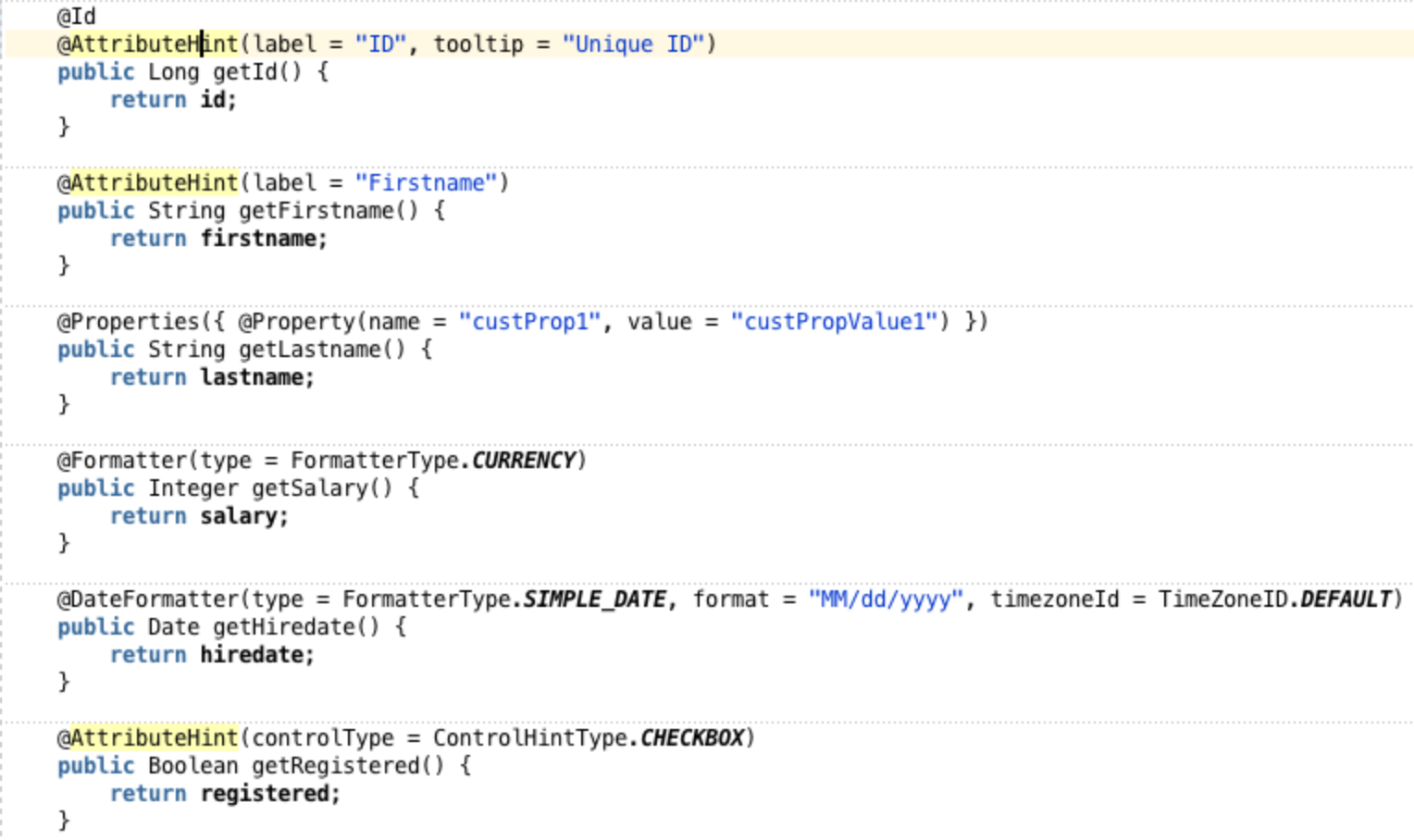
In order to make your DataModel functioning correctly in most cases you should define a primary key. You can do this now with the @Id-Annotation: (No need to generate an XML file for these kind of metadata)
(If using JPA-based entity classes make sure to use the javax.persistence.Id annotation)
Setting UI Hints
To set specific UI Hints like label, tooltip, display, width, height, autoSubmit, controlType, formatType, format, timezoneId, etc. you can leverage the @AttributeHint, @DateFormatter and @Formatter Annotations. Further it is possible to define custom properties through @Property annotations
See the whole feature list for UI Hints here: http://docs.oracle.com/middleware/1213/adf/develop-data-controls/data-controls-ejb.htm#ADFDC996
Note a: If you set UI hints for an attribute both using annotations and in an XML data control structure file, the settings in the data control structure file take precedence.
Note b: When you apply annotations for UI hints, you can not see the affect of the hints in the design-time view of pages that you create based on the data controls. However, you can test and verify the hints using the ADF Model Tester.
BTW: Everything looks easy so far, but: The most challenging part for me was to recognize that these annotations only work on METHOD level and not on FIELD level although there are no compile errors! It felt natural for me to put these annotations on fields, but believe me, it won't have any effect in ADF 12.1.3. So remember
Interesting to note: The @Id Annotation works also on FIELD level!
Testing the result
Running the sample we see that the annotation driven meta data is recognized correctly. It has been applied to Table Column Headers and Form Labels, Formatters and Input-Types.
Setting AccessMode for Collections
For collections you can define the AccessMode (Scroll, Range-Paging or None).
For SCROLLABLE or RANGE_PAGING Mode to work correctly you need to implement the following method signatures (for every collection)
List<Person> getPersons(int firstResult, int maxResults)
long getPersonsSize()
Note: These annotations only work on getter methods.
Testing Metadata Using the Oracle ADF Model Tester
For EJB and Bean Data Controls you can go to the DataControls.dcx file select the given DataControl and exceute „Run" from the context menu.
Gotchas
First everything looks promising. But if you try to do some real world developer roundtrips some gotchas appear. Commenting some annotation out, testing changes etc you notice that some information are not refreshing properly inside JDeveloper. So, e.g.
Step 1: Change primary key definition
Step 2: Open DataControls.dcx
=> The change is recognized correctly by the DataControls Editor.
Step 3: Go to the structure definition file (Person.xml)
=> The old attribute is still displayed as primary key! Expected: firstname, because of the recent changes. Hhhm. Is this a bug? It could lead to frustration and unexpected behaviour. Workaround is to close the JDeveloper application and open it again. Looks like a caching/synchronization failure.
Conclusion
The support for annotations is getting better in ADF. Besides some caching problems at design time views there is missing support for Validation. As JSR 303 (Bean Validation) is Java industry standard and widely adopted it would be cool to see ADF moving in that direction too! At this time Validations on POJO DataModel must be done in the DataControl structure files per entity. Due to the "sparse bean nature" the XML file only for the given entities needs to be generated.
Download
Sample application build with JDeveloper 12.1.3: enpit.sample.dc.annotations-jdev1213.zip
Further information
Tuesday, July 29, 2014
Using FlexSlider as Declarative Component in ADF
In the www there are a lot of cool photo slideshow components which one might want to use in ADF applications too. For example the FlexSlider.
Technically it should be easy to be integrated, e.g. like
..
<flexslider:FlexSlider animation="fade“ id=" fs1="" imagelist="#{someBean.imageList}" />
..
- How to deal with more then one instance on one page
- How to hook the javascript, which typically hooks into the onload javascript phase
$(window).load(function() {
$('.flexslider').flexslider({
animation: "fade" /* or "slide" */
});
});
So here is my solution.
Step 1: Setup an ADF component project und copy all relevant files from the FlexSlider
Step 2: Next create the declarative component FlexSlider.jspx (by using the JDeveloper wizard, generate the component class and TagLibrary). The important part is to generate a unique id for the slider DIV and to make sure to call the needed javascript method to setup the slideshow. The FlexSlider.jspx looks as follows
and for the FlexSlider.java define the following methods
To make the Javascript call we use a known trick to bind the Call to a getter on an af:outputText with visible=„false“.
Drop the declarative component „FlexSlider“ from the component palette onto the given page and bind the given list via EL
As result you will get a reusable UI component to integrate slideshows into ADF applications.
See ADF EMG Issue https://java.net/jira/browse/ADFEMG-244 for the current progress.
Technically it should be easy to be integrated, e.g. like
..
<flexslider:FlexSlider animation="fade“ id=" fs1="" imagelist="#{someBean.imageList}" />
..
Environment
The following sample is based on ADF 11.1.1.7How to do it
Well - in theory - it is quite simple. Take a look at the plain JavaScript/HTML Sample from http://www.woothemes.com/flexslider/ and put all necessary files in your component project which will be bundled as ADF Library for reuse. However based on your use cases (integrate inside a fragment based taskflow) there will be some challenges.- How to deal with more then one instance on one page
- How to hook the javascript, which typically hooks into the onload javascript phase
$(window).load(function() {
$('.flexslider').flexslider({
animation: "fade" /* or "slide" */
});
});
So here is my solution.
Step 1: Setup an ADF component project und copy all relevant files from the FlexSlider
Step 2: Next create the declarative component FlexSlider.jspx (by using the JDeveloper wizard, generate the component class and TagLibrary). The important part is to generate a unique id for the slider DIV and to make sure to call the needed javascript method to setup the slideshow. The FlexSlider.jspx looks as follows
and for the FlexSlider.java define the following methods
To make the Javascript call we use a known trick to bind the Call to a getter on an af:outputText with visible=„false“.
How to use it
Define a simple bean (or could also be a DataControl) that serves a List of ImagesDrop the declarative component „FlexSlider“ from the component palette onto the given page and bind the given list via EL
As result you will get a reusable UI component to integrate slideshows into ADF applications.
Gotchas
The font resources like ttf, eot, woff, svg (that are referenced from the flexslider.css and are being used as the previous/next font-icons) are not served as expected from the ADF Library which holds the custom component. For now the workaround is to copy these resource into your master viewcontroller project. This way you make sure that all resources are loaded.See ADF EMG Issue https://java.net/jira/browse/ADFEMG-244 for the current progress.
Download
enpit.sample.flexslider-jdev11117.zip
Labels:
11.1.1.7,
declarative component,
flexslider,
oracle adf,
slideshow
Monday, June 30, 2014
How to use the Deck component (ADF 12.1.3 New Feature)
With the arrival of ADF 12.1.3 many new features has been introduced. One of those features is the brand new deck ui component. In this blogpost I want to give an example on how to use that new component.
Use Case
The use case is quite simple. Arrange pictures of soccer players in a grid. Once clicked on a picture it is flipped. On the backside you can see more details for the given player. Clicking once again on the card it flips back and shows the picture again. Let's look at the result:
Now clicking on the first pic it flips (with an animated transition) and show details.
How to implement
To implement the described use case create a panelGridLayout first with the following properties
- row: Fixed height
- cell: Fixed width, halign="stretch" and valign="stretch"
Inside each cell place the new af:deck component with two links as child components and two transition operations.
The commandLinks act as clickable cards on the deck. Each transition operation defines the desired animation when transitioning from one card to another. There are a lot of out-of-the-box transitions available as you can see in the screenshot.
Which card is currently displayed on the deck is controlled by the displayedChild attribute. It expects the component id of the given child ui component (in this case the af:commandLinks). The interesting piece of JSF Code for the sample to work is as follows:
To make the sample complete a backing bean is needed to handle the action events on each command link. Main task of the action listeners is to change the displayedChild attribut on the deck component and repaint it on the client (through a partial refresh)
Download
Observations
While implementing the deck sample I did not want to use the deprecated af:commandLink. But converting it to af:link implies a JSF compilation error. So I switched back to the deprecated component.
Looks like the new Link Component is not fully compatible. Is this a bug?
Further Information
- See more af:deck demos at the official JDev/ADF Demo http://jdevadf.oracle.com/adf-richclient-demo/faces/visualDesigns/deck.jspx, http://jdevadf.oracle.com/adf-richclient-demo/faces/components/deck.jspx
- See af:deck documentation in the ADF 12.1.3 Web Developers Guide http://docs.oracle.com/middleware/1213/adf/develop-faces/adf-faces-layout.htm#ADFUI13833
- See af:deck Tag Library Description: http://docs.oracle.com/middleware/1213/adf/tag-reference-faces/tagdoc/af_deck.html
Monday, February 17, 2014
ADF Faces: How to skin a great looking breadcrumb
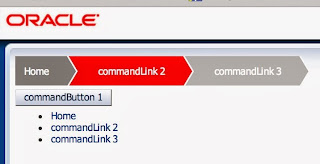
Although the default ADF Skin is fine for many UI requirements, there are often special customer needs for specific design. In this short blogpost I am going to show how you can skin a great looking breadcrumb (with plain CSS). The following picture shows what I am talking about:
Usage
Inside ADF Pages it should be is easy to create such a breadcrumb:
<af:commandLink text="Home" id="cl1" />
<af:commandLink text="commandLink 2" id="cl2"/>
<af:commandLink text="commandLink 3" id="cl3"/>
</af:panelList>
Environment
Created with ADF 11.1.2.4 (but should also work with 11gR1 oder 12c)
Tested with current versions of
- Safari
- Chrome
- Firefox
- IE 9
How to do it
Create a custom ADF Skin with the following CSS Statements
af|panelList.MyBreadcrumb ul {
list-style: none;
overflow: hidden;
display: block;
padding-left: 0px;
}
af|panelList.MyBreadcrumb li {
float: left;
/*display: list-item;
text-align: -webkit-match-parent;*/
}
af|panelList.MyBreadcrumb li:first-child a {
padding-left: 10px;
background: gray;
}
af|panelList.MyBreadcrumb li:first-child a:after {
border-left-color: gray;
}
af|panelList.MyBreadcrumb li a:hover:after {
border-left-color: red;
}
/*af|panelList li:nth-child(2) a {
}*/
af|panelList.MyBreadcrumb li a span {
color: white;
}
af|panelList.MyBreadcrumb li af|commandImageLink {
color: white;
text-decoration: none;
padding: 4px 0 5px 55px;
background: #eee;
position: relative;
display: block;
float: left;
}
af|panelList.MyBreadcrumb li af|commandImageLink:text-only,
af|panelList.MyBreadcrumb li a {
color: white;
text-decoration: none;
padding: 10px 0 10px 55px;
background: #bbb;
position: relative;
display: block;
float: left;
}
af|panelList.MyBreadcrumb li a:hover {
background: red;
text-decoration: none;
}
af|panelList.MyBreadcrumb li a:before {
content: " ";
display: block;
width: 0;
height: 0;
border-top: 50px solid transparent;
border-bottom: 50px solid transparent;
border-left: 30px solid white;
position: absolute;
top: 50%;
margin-top: -50px;
margin-left: 2px;
left: 100%;
z-index: 1;
}
af|panelList.MyBreadcrumb li a:after {
content: " ";
display: block;
width: 0;
height: 0;
border-top: 50px solid transparent;
border-bottom: 50px solid transparent;
border-left: 30px solid #bbb;
position: absolute;
top: 50%;
margin-top: -50px;
left: 100%;
z-index: 2;
}
Hint
I know that the usage of direct HTML Selectors in ADF Skin files is not a good practice because the skin could break if upgrading to a new ADF Version. If you like feel free to improve the CSS.
Download
References
Friday, February 14, 2014
ADF: Handling exceptions from BackingBeans inside bounded Taskflow explained
Scenario 1
Exception is thrown in actionListener Code for a commandButton inside a View of a bounded taskflow based on page fragments.
In our example Test1ViewBean is in Request-Scope and contains an ActionListener method that throws a NullPointerException for demo purposes.
This ActionListener is called from a command button
The Default behaviour in this scenario is the following:
Of course this is not user friendly (+ may cause side effects) so we should use one of the provided ADF Exception handling mechanisms to fix that.
Solution to scenario 1:
Make a guess: (a) DCErrorHandler (b) BTF-Exception-Handler (c) UTF-Exception-Handler (d) Faces-ExceptionHandler (e) Servlet-Exception Handler
Tam da da dam: Solution is "(c) UTF-Exception-Handler" not "(b) BTF-Exception-Handler" as some of you might expect.
Let's see how it works. Create a Method-Activity in adfc-config.xml
and mark it as Exception-Handler.
The Method Activity points - by EL - to the following java method:
ControllerContext cc = ControllerContext.getInstance();
Exception ex = cc.getCurrentViewPort().getExceptionData();
String message = ex.getMessage();
FacesContext fc = FacesContext.getCurrentInstance();
FacesMessage facesMessage =
new FacesMessage(FacesMessage.SEVERITY_ERROR, "UTF: " + message, null);
fc.addMessage(null, facesMessage);
cc.getCurrentRootViewPort().clearException();
fc.renderResponse();
}
Having this Exception-Handler active on runtime the Exception is catched an displayed in a user friendly inline popup
Why the "(b) BTF-Exception-Handler" is not working in the given scenario?
Well, it is because the action event is handled in the standard JSF Lifecycle (invoke application phase) and not inside the ADF Controller of the bounded taskflow.
Download
In the sample application - based on ADF 11.1.1.7 - you can test the different cases and see how everything works in each scenario. enpit.sample.adf.testExceptionHandling-jdev11117.zip
Further Reading
- Oracle ADF: Catch me if you can http://www.oracle.com/technetwork/issue-archive/2013/13-mar/o23adf-1897193.html
- Exception Handler for Method Calls inside ADF Task Flows with Fragments - http://andrejusb.blogspot.de/2011/03/exception-handler-for-method-calls.html
- Task Flow Exception Handler. You must have it. http://adfpractice-fedor.blogspot.de/2011/12/task-flow-exception-handler-you-must.html
Subscribe to:
Posts (Atom)