Monday, March 28, 2016

Running Node.JS Apps and "Fat-JAR" Apps on Application Container Cloud Service


With the trend of container technologies going on it is great to see Oracle is providing the so called Application Container Cloud Service. Its current architecture is based on Docker and allows to run Java SE and Node.js applications in its current version. See the the following diagram


The Load Balancing, dockerizing and scaling is fully transparent. From developer perspective you are deploying a ZIP containing a manifest.json with a command property that states what should be executed once the deployment has been installed on the specific container.

In the following figure you see the overview screen of Application Container Cloud service (ACC).


Next lets create an app and deploy it to ACC. For Java SE lets see how that manifest.json looks like

Java SE App

The important properties are runtime / majorVersion and command. It states that the deployment needs Java 8. The application is started with the given "java -jar ..." command. Currently two working samples are provided, one works with embedded Tomcat the other works with Grizzly Http Server. Here is how a typical Main.java class would look like


The PORT and HOSTNAME are given from the environment. So it is in control of the application container cloud service.

Node.js App
For a Node.js app that manifest.json looks like

It expects a file server.js as the main entry point. There is an official Node.js sample application (together with a Tutorial). In my example I am going to create a connection to Oracle Database Cloud Service (via oracle nodedb driver) and expose DEPARTMENTS as a read online REST Resource.

The most interesting part here is how to retrieve the CONNECT String to the Database.

For testing on local machine defaults are used. Once deployed the CONNECT String is given as an environment property (beyond PORT, USER, etc).

Hint: All the JavaScript modules except native add-ons like node-oracledb should be included in the ZIP bundle.

Deployment
The deployment is quite straightforward from the ACC UI using the "upload application archive" option. Further you can provide initial values for number of "Instances" and Memory.

After about 5 min. the application is available through the Load balancer. For automated deployment a REST API exists.

To connect to other cloud services a service binding needs to be created first. The service binding creates environment variables that are available to every application instance.

Custom environment variables can be created. For example the schema user / password you want to connect with. Unfortunately just clear text values are accepted at the moment. Would be great to have a "secret type" for passwords. Further  # characters are not allowed (although my schema name is c##hr  ;) ).  Anyway it is no major show stopper.


See the sample service running in Postman


Logging / Diagnostics
Logs are stored on the Oracle Storage Cloud Service as a zip file. To look into the log files you have to download those ZIP files on your local disc first

For Java SE Apps a Flight Recording is possible.

Summary

The first public release of ACC looks quite promising. For the next versions my wishlist would contain
- Online Log Viewer
- Monitoring RAM / CPU Usage / Requests online
- Automatic Scaling
- Service discovery
- Security ?
- Adding environment variables of type "secret". (Currently you can only provide variables in clear text)
- Packaging improvements, maybe some mvn acc:install or CLI Tooling


Looking forward to new features in the future versions. There is potential for a modern microservice platform.

Samples Code
Explore the Node.JS sample code on https://github.com/enpit/enpit.sample.acc-node-hrapi
The Java SE jersey based code is available from Oracle.

Further Information

Tuesday, February 9, 2016

ADF Spotlight: REST in ADF 12.2.1

In the recent ADF Spotlight Webconference I have given a presentation and live demo on some of the new REST features in ADF 12.2.1. The recording (in german) is on youtube: https://www.youtube.com/watch?v=SmrINlqVNPs

The new REST features (to create REST resources) are implemented on top of Application Module (WebServices > REST). Here you can choose a Root View Instance, assign it to a release version and further configure the defined REST resource in a new Overview Editor.

Following summarizes some of the new REST features in ADF:

Resource Versioning

Versioning is the first thing need to be configured before you can start creating REST resources. It is supported at the level of the adf-config.xml file. Here you can define different versions. Each version can be configured as  active, deprecated or desupported. To keep things simple I recommend to use same name for internal and release name.


Versions marked as desupported will reply with HTTP 500  and corresponding message. They will not serve any REST Data.


Versions marked as deprecated will work. If you invoke the URL for v2 metadata you will get information that there is a successor-version:


It implements the HATEOAS principle and therefore is very developer friendly.

Read, Create, Update, Delete Out-of-the-box

By default all REST HTTP Methods are exposed on a resource. GET for read, POST for Create, DELETE for Delete. To partially update a resource (only some attributes e.g.)  the PATCH method is exposed.  For PUT you need to provide all attributes (It will do kind of a replace).

Important: When working with the REST API it is important to set the Content-Type to application/vnd.oracle.adf.description+json otherwise there will be the following exception:

oracle.adf.internal.model.rest.core.exception.CannotParseContentException: The PayloadParser could not be found in the ResourceProcessingContext.

See the following Postman PATCH sample:

Pagination for collections by default

Having a REST collection ADF automatically exposes parameters for pagination. Just append limit und offset as URL parameters and your good to go. see next pic to get a feeling how the parameters affect the response:

Children and LOVs as sub-resource

This is also a pretty great feature. 

By a simple configuration child view object instance will be exposed a sub-resources.


Configured LOVs on specific attributes will by default be exposed as sub-resources too. See example in postman:

Attribute Shaping

By default all attributes of a View Object will be exposed in the REST resource. If you want to expose only a subset of the attributes you can define "Service Shapes" on the View Object

and use those to customize the REST resource (Tab: Attributes)


Security

Securing ADF REST Resources is quite powerful. It works just like with Pages / Taskflow Permission. You just need to run the ADF Security Wizard on the RESTWebService project.

More features

Canonical Link

The canonical link is used to link to a resource that represents the full representation (of REST resource). This can be an "internal" defined View Object or an external (by pointing to the corresponding) ADF Connection.

See details in the Dev Guide: How to expose canonical Resources

RowFinder Key

With RowFinder configuration it is possible to change the URL of a resource from e.g. /employees/100 to /employees/SKING

Expose Custom Methods in the ADF REST Resource

To be evaluated ;) The ADF Documentation is not very clear about that topic.


--
Sample Code: https://github.com/enpit/enpit.sample.adf1221.restsandbox

Further information


Wednesday, December 16, 2015

WebLogic 12.2.1 on Docker

Probably everybody in IT has noticed the rising of Docker in last 2 years. Since March 2015 Oracle has certified WebLogic Server on Docker. This is good news. Beyond all buzz around containerization and Docker in particular there is great use for it. Especially during development or testing of an application for WebLogic you can benefit without too much investment (time, skills). Further, since the first day of WebLogic 12.2.1 release it is certified on Docker.

In preparation for one of my last talks lately I decided to checkout this new version. Subsequently are my experiences so far.

Using the following Environment: WebLogic 12.2.1, Mac OS 10.11 , Docker 1.9, Docker Compose 1.5 . I will not go into Docker details here. There is a lot of introductorily Docker content available on the web.

WebLogic on Docker Overview

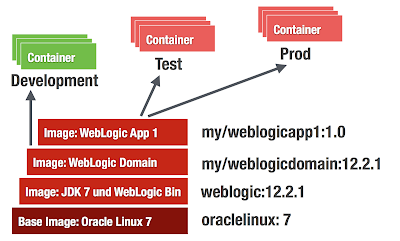
There are no prepackaged WebLogic Docker images available (basically because of user licence agreements) so the images must be build manually from Dockerfiles (provided at GitHub). The following figure shows the needed layers of images to actually start running containers.
  • oraclelinux image - officially available from Docker Hub
  • weblogic binaries image - must be build from Dockerfile (Available on GitHub)
  • weblogic (empty) domain image - must be build from Dockerfile (Available on GitHub)
  • application image - must be build from custom Dockerfile (its your turn)

Prerequisites

  1. Learn some Docker basic skills (if it is new to you)
  2. Download Docker Toolbox 1.9. It exists for Linux / Windows / Mac. It makes you getting started "to docker"  in seconds. (On Win / Mac it installs VirtualBox if needed)
  3. Git Clone https://github.com/oracle/docker/tree/master/OracleWebLogic (Update 12/20/15: it has been updated to https://github.com/oracle/docker-images/tree/master/OracleWebLogic
  4. Download JDK 8u60 http://download.oracle.com/otn/java/jdk/8u60-b27/jdk-8u60-linux-x64.rpm
  5. Download WebLogic 12.2.1 Binaries (I am building the DEV/QUICK Version here. So it is: fmw_12.2.1.0.0_wls_quick.jar)
  6. Copy the JDK / WLS Binaries into the cloned workspace /OracleWebLogic/dockerfiles/12.2.1

How To: Build WebLogic 12.2.1 Developer Image

dockerfiles ak$ sh buildDockerImage.sh -v 12.2.1 -d

Building image 'oracle/weblogic:12.2.1-dev' based on 'developer' distribution...
Sending build context to Docker daemon 1.204 GB
Step 1 : FROM oraclelinux:7.0
7.0: Pulling from library/oraclelinux
f359075ce4d8: Pull complete
..
..
Successfully built 251b87118c43

WebLogic Docker Image for 'developer' 12.2.1 is ready to be extended: oracle/weblogic:12.2.1-dev
dockerfiles ak$ docker images
REPOSITORY                    TAG                 IMAGE ID            CREATED             VIRTUAL SIZE
oracle/weblogic               12.2.1-dev          234ea4e45bc7        44 hours ago        1.738 GB
oraclelinux                   7.0                 707f44423637        7 weeks ago         197.2 MB


How To: Build WebLogic 12.2.1 Sample (Empty Domain) Image

This is pretty straightforward. Just change into the sample directory and kick off the docker build.

samples/1221-domain$ docker build -t enpit/samplewls:12.2.1-dev .
...
akmac2:1221-domain ak$ docker images
REPOSITORY                    TAG                 IMAGE ID            CREATED             VIRTUAL SIZE
enpit/samplewls               12.2.1-dev          3861d745a0bc        44 hours ago        1.739 GB
oracle/weblogic               12.2.1-dev          234ea4e45bc7        44 hours ago        1.738 GB
oraclelinux                   7.0                 707f44423637        7 weeks ago         197.2 MB

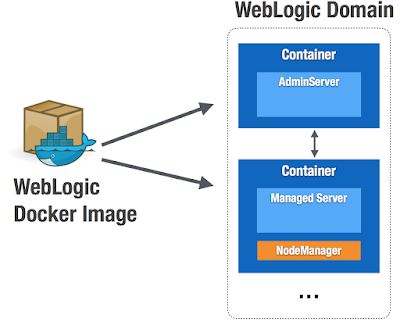
At this point you have an image from that you can run weblogic containers. Having some Shell scripts included the image supports different types of containers to run. This is because of WebLogic Domain concept. See next Fig.


Run WebLogic AdminServer Container (the "Docker-Way")

Nothing easier then that:
akmac2:1221-domain ak$ docker run -d -p 8001:8001 --name=wlsadmin enpit/samplewls:12.2.1-dev
545cc33b8703586b1cc9098bbffe5d48ae6810c031c5104a8828b6718eb9fd03
akmac2:1221-domain ak$

The container starts the default command from the Dockerfile which in this case is "startWebLogic.sh"
(Providing a name is optional but it helps to better identify the running container)

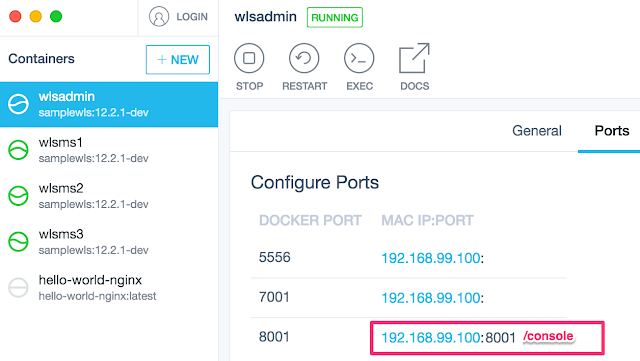
The easiest way to get the right IP / URL to access the Admin Console is looking at the Kitematic UI in the "Ports" Tab

So in my case I access the WebLogic Admin Console http://192.168.99.100:8001/console . Logging in with defaults weblogic / welcome1. With the above command you can now start as many AdminServers (in its own WebLogic Domain) as you want.

Extend WebLogic Domain with Managed Servers (Classical WebLogic Topology) 

Starting Managed Server Containers is also straightforward (if the Dockerfile is working for you. I had to make some modifications. See later)
akmac2:1221-domain ak$ docker run -d --name=wlsms1 --link wlsadmin:wlsadmin -p 7001:7001 enpit/samplewls:12.2.1-dev createServer.sh
bd8d53209781ea52096fba166fa6190b336366f3c0673b0a7452822a0e6d7a44
akmac2:1221-domain ak$

To add another managed server just run with different name parameter and map the container 7001 port to a different host (docker machine) port if you want to access the managed server directly
akmac2:1221-domain ak$ docker run -d --name=wlsms2 --link wlsadmin:wlsadmin -p 7003:7001 enpit/samplewls:12.2.1-dev createServer.sh
7389bfa89ffe0e07a286a9a88e3b0a3f30a77a33f464af4f8264efdc00ae7313
akmac2:1221-domain ak$
..

The createServer.sh Skript connects to the admin server, extends the domain by a machine (the container) and a managed server entry. Further it starts the NodeManager.

In the Admin Console you should notice the new machines and Managed Servers. (The managed server must be started manually; the createServer.sh Script is not doing it (Update 12/20/15: the scripts has been updated so managed server starts automatically)). In my sample I then have the following configuration

(Update 12/20/15: the following two issues might have been fixed in GitHub Repo)
Note: In order to make the above "createServer.sh" work for me I had to do the following modifications (and rebuilding the image of course)
(1) Issue: createServer.sh file not found ....
Adjust the sample 1221-domain/ Dockerfile.emptydomain.

Fix: I added the following underneath the statement "USER root"
RUN chmod +x /u01/oracle/*.sh && chown oracle:oracle -R /u01/oracle

(2) Issue: When the "createServer.sh-container" started and I try to start the managed server through Admin Console (that actually is done through the NodeManager) the process just hangs after a while... To fix that I modified the file
1221-domain/container-scripts/add-server.py:
Change the arguments for starting the managed server with additional argument.
..
arguments = '-Djava.security.egd=file:/dev/./urandom -
..
(It is a known "issue" on headless systems because of missing keyboard/mouse input entropy for random device)

Note: After making those changes and rebuild the "empty wls domain image" the "createServer.sh"-script worked as expected for me. But I noticed an increase in the image size from 1.7GB to 2.3GB. Not sure where it comes from. Maybe because I tried some other changes to make the Dockerfile work for me.  I need to investigate more and/or file an issue on that. 

Building an Java EE Application Image

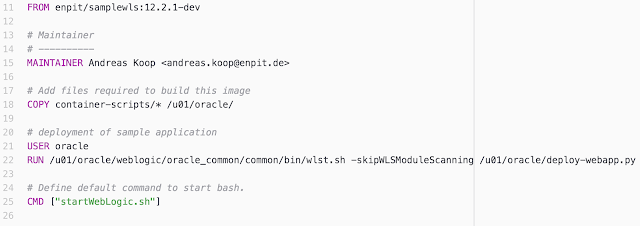
Well, that's pretty straightforward. I took some existing WAR file from a tutorial (shoppingcart.war) and dockerized that app by creating a WLST Deploy script and of course a Dockerfile (that extends the WebLogic 12.2.1 Dev Domain Image)

Here is the Dockerfile:

And here the sample deploy WLST script:


Notice that the Admin Server is started during the build time in order to deploy to the AdminServer.
To build the sample Java EE application you need to run:
docker build -t enpit/shoppingcart:1.0-dev .

Now you have a dockerized simple Java EE application that you can run with

docker run -d -p 8001:8001 enpit/shoppingcart:1.0-dev

Composing and Running Multi-Container Applications

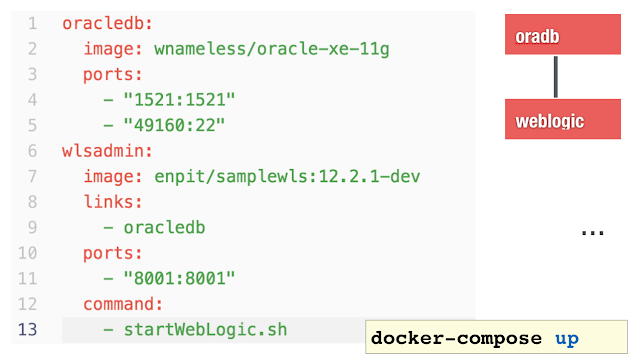
Well this should be a post for itself.  But to give you an impression for more complex scenarios: Typically you will run a database or more services that you WebLogic application is based on. Sure it is possible to link containers as shown in the previous sections but with more services it becomes a tedious task. Docker Compose helps to configure a multi-container environment that can simply be started with a single command: docker-compose up

The following docker-compose.yml file configures and links an oracle database-xe container and a weblogic container.

Here is the sample output docker compose provides (if running without -d option)
akmac2:1221-testds-app ak$ docker-compose up
Creating 1221testdsapp_oracledb_1
Creating 1221testdsapp_wlsadmin_1
Attaching to 1221testdsapp_oracledb_1, 1221testdsapp_wlsadmin_1
oracledb_1 | Starting Oracle Net Listener.

wlsadmin_1 | ..
wlsadmin_1 | ..
oracledb_1 | Starting Oracle Database 11g Express Edition instance.
wlsadmin_1 | ..
wlsadmin_1 | ..
wlsadmin_1 | Dec 16, 2015 10:19:14 PM GMT Notice WebLogicServer BEA-000360 The server started in RUNNING mode.

This should just give you an idea that simple Docker containers are just the beginning. With Docker Compose (and Docker Swarm) there is more to come.

Summary and Conclusion

Docker is fun and fast. It is easy to get started. The official provided WebLogic Dockerfiles on Github from Oracle help a lot to get started quickly. But be aware of that the Dockerfiles not meant to be perfect. Its an example how to get started and build your own WebLogic Docker images. The sample domain had to be adjusted otherwise the WebLogic JVM process did not start for me. But since the Dockerfiles are shared on GitHub it's easy to contribute. Bruno Borges and Monica Riccelli from Oracle are doing a great job in making all that to work and being certified by Oracle. Thank you guys!

For a long time WebLogic user it is untypical why port 8001 is used as default HTTP AdminServer Port. Why not running it on 7001 and use 8001 for Managed Server? or 7003, 7005 etc for managed server. ? (Note to me: Open an discussion on GitHub and fix that)

When running the ManagedServer (MS) type of container the MS is not started automatically. With some WLST scripting it could be improved I think.

Using docker-compose it should be possible to set up a cluster configuration and easily run it with: docker-compose up.

With Docker 1.9 Networking / Persistent storage capabilities and accordingly Docker Compose and Swarm has been greatly improved. This is great news. As it is going to allow Multi-Host WebLogic Cluster Containers. (Update 12/20/15: Multi-Host WebLogic Cluster Sample has been added in the corresponding GitHub Repo. Kudos to Bruno; great work!)

So there is still changes going on but in terms of simplification and improvement. I hope to see Docker Compose And Swarm for WebLogic working soon. But it will need some time because compose/swarm is sill experimental. There might be some networking issues at the moment of this writing.

Further information


Check out the presentation from DOAG 2015 (GER)

Tuesday, November 3, 2015

Consume JSON based ADF REST Services in ADF 12.2.1 (with REST DataControl)

In ADF 12.2.1 the capabilities for handling with REST services has been greatly improved. You can now expose ADF BC (ViewObjects) as  REST service in JSON format.  On the other hand there are improvements in the REST DataControl.

In this blog post I am going to show how to consume this REST Service and create a basic ADF Table.

So here is a basic REST Service for employees


REST DataControl with JSON Support

From „New Gallery“ open the following wizard


The create web service data control wizard launches. Choose REST option.


Next you can decide whether you consume a REST service, that has been exposed through ADF BC Application Module or a generic REST service. The difference here is that the ADF based REST service exposes additional meta data that describes the structure and types of the return JSON structure. This makes it possible to automatically get a type-aware DataControl on REST/JSON service which is generically not the case. See next screenshot to get a feel of the feature of an ADF REST Service and this particular describe feature.


So lets add an ADF REST Connection


Important note: Do include the version name and resource name, but do not include any URL parameters.

Next it is possible to choose from Security Policies

Since in this example we do not use any security just skip this page.

Next you can choose to add all resources or specific one. in this case I have only one resource exposed


Click Next and Finish.

=> The DataControl will be created. Every attribute type is correctly derived from the rest metadata (ADF REST service specific).


(Interesting to note, that EmployeeId is not marked as the primary key. Although it is in the ADF BC ViewObject definition from which the service has been previously created. Well it is because of the REST nature of this Collection. Resources typically must not match every attribute of an ADF ViewObject. It could be a subset. Therefore the canonical attribute represents the primary key which is typically the URL to the canonical resource. In our case the canonical resource is the resource itself :))

Next steps are as easy as with any other DataControl. Just create an ADF table via drag and drop

Run the page.


Table is displayed. Filtering works BTW too. Nice.

Since we are consuming an ADF REST Service lets see if we can update a record. Therefore Drag and Drop the „Commit“ Operation from the Data Control. Create a button and name it „Save changes“. For a simple testcase we change the salary from initially 10000 to 5000. Press „Save changes"


Looking into the database you will notice the change


Pretty cool.

Issues

Removing the Filter results in an NullPointerException. Hhhm that is disappointing. Looks like nobody has tested this so far ;).


Refreshing the page the table keeps empty (Not data to display). Looks like a bug. It would not surprise me. Anyone feel free to file a SR to Oracle.

Sample applications

Provider: enpit.sample.adf1221.restprovider.zip
Consumer: enpit.sample.adf1221.restconsumer.zip

Further information

ADF 12.2.1 Developers Guide:

16.3.1 How to Expose Canonical Resources in the ADF REST Resource
22 Consuming RESTful Web Services Using the ADF REST Framework

Wednesday, October 28, 2015

Oracle JET is here - for JavaScript lovers

Oracle makes a big move towards client side HTML5 enterprise application development - based on a collection of proven open source JavaScript tools: Oracle JET - the JavaScript Extension Toolkit. After 3 years of active development and internal usage for its Cloud products at Open World 2015 it has been made publicly available.

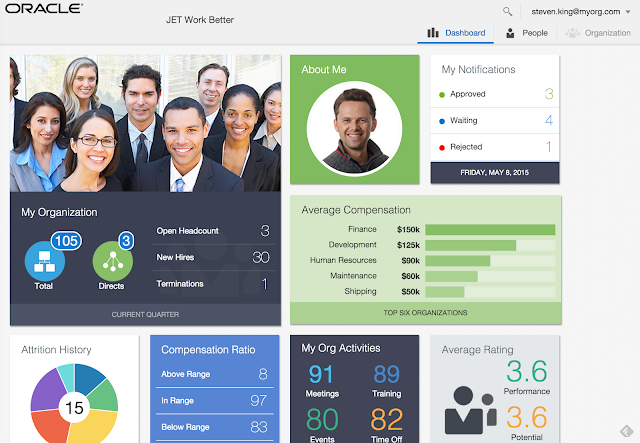
To get a feel of an Oracle JET application check out the "WorkBetter" JET Demo:
 Oracle JET Demo Application

Oracle JET provides a rich set of Oracle JET UI components that you can use out of the box (based on Alta UI). The documentation contains code snippets which can be used to integrate the desired UI controls in your application. (If you are a business user (with a certain affinity and love for IT) you will be able to use Oracle JET components inside "Oracle Application Build Cloud Service" )
 Oracle JET UI Components

For data visualization it is almost the complete set you may know from ADF. This is pretty cool.

Oracle JET (Enterprise) Features

Comparing to other UI Toolkits it is great to see that important aspects of every enterprise application has been addressed.

  • Support for localization & internationalization
  • UI Components are implementing the latest WCAG 2.0 / WAI-ARIA accessibility guidelines
  • Theming support - Default is Alta UI
  • Security - Oracle JET API provides the oj.OAuth authorization plugin which supports the OAuth 2.0 open protocol

Oracle JET Technical Base

Obviously the core of Oracle JETs stack is based on HTML5 / JavaScript / CSS3. For certain aspects it uses proven JavaScript Libraries for Binding, Templating and Modularization.


How does it compare to ADF

Well,
Oracle ADF Faces - for Java developers looking for a set of JSF components implementing Alta UI
Oracle JET - for JavaScript developers looking for a set of components implementing Alta UI

In the Javascript ecosystem there are a lot of changes. If you do not want to deal with all of that ADF is the right choice. If you love Javascript and want to embrace every new JavaScript libraries then Oracle JET is for you.

Further Information on Oracle JET

I have put together most of the interesting things to get started on Oracle JET. BTW, For next year it is announced that it is going to be available open source on GitHub!

Oracle JET - Getting Started
http://www.oracle.com/webfolder/technetwork/jet/globalGetStarted.html

Oracle JET Quickstart Basics
http://www.oracle.com/webfolder/technetwork/jet/public_samples/OracleJET_QuickStartBasic/public_html/index.html

Oracle JET UI Controls Overview
http://www.oracle.com/webfolder/technetwork/jet/uiComponents-formControls.html

Oracle JET Hands On Lab
http://www.oracle.com/webfolder/technetwork/jet/globalExamples-HOL.html

Oracle JET Developers Guide
http://docs.oracle.com/middleware/jet112/jet/developer/toc.htm

Oracle JET Community
https://community.oracle.com/community/development_tools/oracle-jet

Oracle JET Quick Demo on Youtube
https://www.youtube.com/embed/Qf7s-VVVpwo

Oracle Alta UI
http://www.oracle.com/webfolder/ux/middleware/alta/index.html


Keep up to date with Oracle JET

Oracle JET YouTube Channel
https://www.youtube.com/channel/UCcPYy1QhTNyR6fPAGLEsSTw/feed

Oracle JET on Twitter
https://twitter.com/OracleJET

Oracle JET on Google+
https://plus.google.com/111856587728259117930

Saturday, October 24, 2015

ADF 12cR2 (12.2.1) with lots of new features available - as part of Fusion Middleware 12.2.1 release, including WebLogic, SOA, WebCenter and Forms/Reports

Just before Open World 2015 & JavaOne open its doors for Oracles annual conference in San Francisco the long awaited ADF / WebLogic 12.2.1 has been released as part of Fusion Middleware 12.2.1.


The most interesting Updates to JDeveloper & ADF & WebLogic in terms of platform are

  • It runs on JDK 1.8. JDeveloper supports 1.8 features
  • Full Java EE 7 Support
  • Integration with Java Cloud Service (not only SaaS Extention and Developer Cloud Service, git etc)
  • Better Maven integration
On the feature list of ADF 12.2.1 there are mainly these cool things available
  • REST Service DataControl + REST from ApplicationModules
  • Responsive Layout features (af:matchMediaBehavior) and new Responsive Template (Masonry layout)
  • Remote Regions - Consume Taskflows remotely
  • Improved Data Visualization components

I am really looking forward to try out the many new features.

Further Information