Wednesday, February 25, 2015

Oracle ACE Director Confirmation and Fusion Middleware Forum 2015 in Budapest

I am happy to say having been nominated as Oracle ACE Director and being accepted lately. Big thanks to the ACE Program and everyone who was involved and made this happen.  I feel really honoured! It motivates me to participate and contribute more with the community.

It is challenging doing the daily business, taking time for conferences, writing blog posts, sharing Oracle FMW Content through social media channels, enjoying free time with family, etc.  Anyway whenever time permits I will try to continue with content contribution for Oracle ADF,  WebCenter, WebLogic, Cloud Services, MAF! Hope you enjoyed my existing posts so far and will enjoy it in future :) @oracleace thanks for the nice welcome gifts!


Find my ACE Profile page here.


Oracle Fusion Middleware Forum 2015

This year I am going to attend the annual OFM Forum in Budapest with lots of great presentations and Hands-On. It is organized by the SOA Community (led by Jürgen Kress). I am looking forward to meet with the community and see what Oracle plans for the upcoming FMW & Cloud Services.

SOA Suite 12c & Integration Cloud Service
BPM Suite 12c & Process Cloud Service
Mobile & Development tools & Mobile Cloud Service
WebLogic 12c & Java Cloud & Developer Cloud Service


There are 6 days left to register ;)
March 3-4, 2015, 10:30 AM - 5:00 PM
Check out the Agenda and Registration!


More Information


Sunday, January 25, 2015

ADF 12c Deck component Overview & Programmer examples

This year the german ADF Community resumed with "ADF Spotlight" - a series of 30 min Webcasts. It was my turn to give use cases and a programmers overview for the ADF 12c deck component. Since I like to share with the international community I made an english version of the few slides.


Download Sample: enpit.sample.adf1213.deck-jdev1213-v2.zip (It contains the use case for Image -> Detail and Slideshow)

Further information


Sunday, November 16, 2014

Create RESTful Services and deploy to Oracle Java Cloud Service with Netbeans

In preparation to one of my DOAG 2014 talks „Java WebApps and Services in Oracle Cloud" I created a new trial account for Oracle Java Cloud Service (http://cloud.oracle.com) two weeks ago. Now was the time to create a RESTful Service and deploy it to the cloud and make it accessible to public. 

Last time I tried the Oracle Cloud I used exclusively JDeveloper, this time I made my experience with Netbeans. From my point of view Netbeans has pretty good support for generating RESTService from Database tables. In a couple of minutes it is possible to create CRUD Operations and make it accesible by a REST endpoint. No matter what content type you prefer, by using JAXB XML and JSON content types are both automatically available.

Prerequites
Step 1: Create an Oracle Java Cloud Service trial account (fee less for 30 days)
Step 2: Download and install Netbeans Version 8.01 (http://www.netbeans.org)
Step 3: Make sure to install the Oracle Cloud plugin (1.5)  in Netbeans


Step 4: Download and Install (just unpack) Oracle Java Cloud  Service - Saas Extension SDK (release 14.1.12.0 Find it here: http://www.oracle.com/technetwork/middleware/weblogic/downloads/java-cloud-sdk-1848874.html)
Step 5: Next add your Oracle Cloud account as Cloud Provider to Netbeans (Goto „Services" Tab and provide your cloud account details)

Step 6: Add a WebLogic Service Instance under ‚Services Tab', so you are able to test the RESTService locally prior to deploying to Oracle Cloud. (I am not going into detail in this post for that task)

Step 7: Make sure to deploy your DB Schema objects plus data into Oracle Database Cloud Service (when subscribing to Java Cloud Service you will get the DB Service as well). See in my previous posts for more details.

HowTo develop RESTService with Netbeans
Everything is setup for cloud deployment. Now let's create a simple REST-Service on top of the HR  DB Tables EMPLOYEES and DEPARTMENTS.

Step 1: Start Netbeans, Create new Project Wizard from Type „Maven / Web Application"
Step 2: Enter your desired groupId, ArtefactId etc.

Step 3: Choose Oracle WebLogic as ‚Server' and Java EE Version 5.

Click Finish.

Step 3: Start „RESTFul Services from Database" Wizard


Step 4: Make a connection to your local database and select the desired Tables.


Step 5: Review and adapt Package-Settings if desired

Next:

Confirm your input and let Netbeans generate the source code. If you like you can make some adjustments to the generated code. Typically I would change the REST resource path. (in my sample: to „employees")


Step 6: In order beeing deployable to Oracle Cloud we need to make further some adjustments. That
is
Adjustment 1: web.xml
(1) We need to change the servlet class from org.glassfish.jersey.servlet.ServletContainer to com.sun.jersey.spi.container.servlet.ServletContainer because the prior class is not available on the cloud server. (2) Further add an <login-config /> if you want to make the Service publicly (without authentication) available.

Adjustment 2: weblogic.xml
Add a library reference to jax-rs 1.1
Adjustment 3: persistence.xml
Configure your Cloud DB Service name as JNDI Data Source


Deploy RESTService to the cloud

Step 1: Open Project Properties, Choose ‚Oracle Cloud Remote" Server Type, Java EE Version 5

Step 2: Execute ‚Run'
The cloud deployment will start...

The WAR file will be virus scanned...
And Finally deployed to the cloud.

Test the cloud RESTService
If using Chrome install the Postman extension to test the Service. e.g. to test different content types. JSON, XML
….


Administer Oracle Java Cloud Service from within Netbeans
Right under the Service Tab your able to Open the Apps, Start, Stop or Undeploy.

To view the Job Status and Logs open the corresponding view from the Oracle Cloud entry.


Troubleshooting
If something goes wrong open the Cloud Job View and Logs Tab to check the details, e.g. if a deployment fails. (1) ClassNotFound Exception

Solution in that particular case is: Use com.sun.jersey.spi.container.servlet.ServletContainer instead of org.glassfish.jersey.servlet.ServletContainer.

(2) java.lang.AbstractMethodError: javax.ws.rs.core.UriBuilder.uri(Ljava/lang/String;)Ljavax/ws/rs/core/UriBuilder

Solution: Somehow the generated POM had a fixed reference to JAX-RS Library which is provided from the cloud server. So I changed that dependency

Conclusion
- Having everything setup (Cloud SDK, local WebLogic Servece, DB Objects in the Cloud Service) it is quite easy to build and deploy RESTful services.
- Why is the SDK not bundled with the Netbeans Oracle Cloud Plugin?
- I wish there would be that kind of wizard (RESTful Services from Database) for JDeveloper ;)


Further Information
- See also: http://www.oracle.com/technetwork/articles/java/enterprise-cloud-2227135.html (Build with NetBeans IDE, Deploy to Oracle Java Cloud Service)

Wednesday, September 3, 2014

Annotation Driven Bean and EJB DataControls in ADF 12c


So as the trend of using annotations over XML configurations goes on and on in software development there is no exception to  ADF. Many developers asked for more annotations to configure metadata on Bean DataControls. Since ADF 12c finally there is support for annotations on Bean and EJB DataControls. Let's have a look on it.

Sample POJO DataModel
In my sample I am using a simple Data Model that I want to expose as Bean DataControl to check the new annotation features. We use simple POJOs „Person and a PersonService". See next figure


Next we want to see some of the annotation features in action.

Primary Key Definition
In order to make your DataModel functioning correctly in most cases you should define a primary key. You can do this now with the @Id-Annotation: (No need to generate an XML file for these kind of metadata)


(If using JPA-based entity classes make sure to use the javax.persistence.Id annotation)

Setting UI Hints
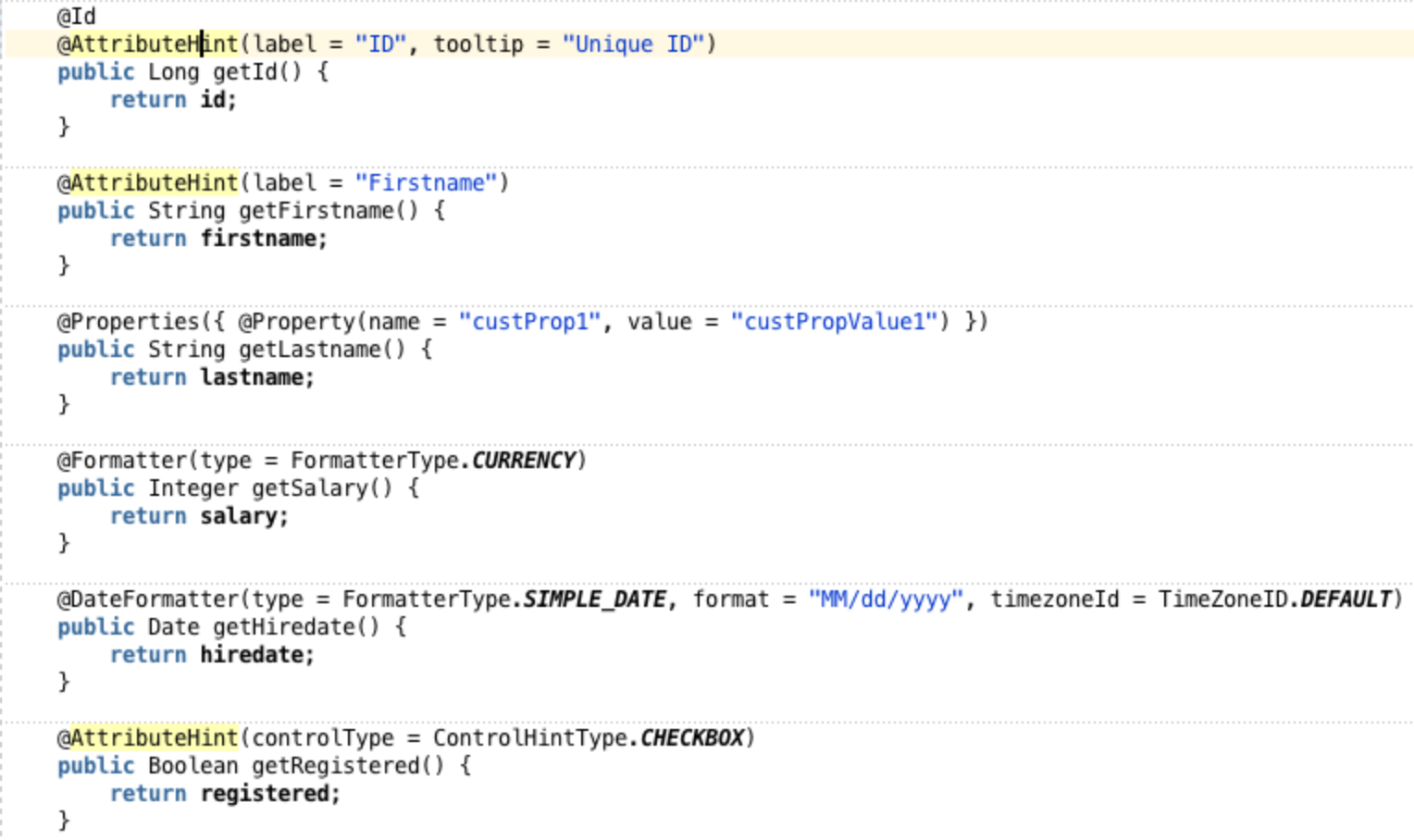
To set specific UI Hints like label, tooltip, display, width, height, autoSubmit, controlType, formatType, format, timezoneId, etc. you can leverage the @AttributeHint, @DateFormatter and @Formatter Annotations. Further it is possible to define custom properties through @Property annotations


Note a: If you set UI hints for an attribute both using annotations and in an XML data control structure file, the settings in the data control structure file take precedence. 
Note b: When you apply annotations for UI hints, you can not see the affect of the hints in the design-time view of pages that you create based on the data controls. However, you can test and verify the hints using the ADF Model Tester. 

BTW: Everything looks easy so far, but: The most challenging part for me was to recognize that these annotations only work on METHOD level and not on FIELD level although there are no compile errors! It felt natural for me to put these annotations on fields, but believe me, it won't have any effect in ADF 12.1.3. So remember

Interesting to note: The @Id Annotation works also on FIELD level!

Testing the result
Running the sample we see that the annotation driven meta data is recognized correctly. It has been applied to Table Column Headers and Form Labels, Formatters and Input-Types.


Setting AccessMode for Collections
For collections you can define the AccessMode (Scroll, Range-Paging or None).

For SCROLLABLE or RANGE_PAGING Mode to work correctly you need to implement the following method signatures (for every collection) 

List<Person> getPersons(int firstResult, int maxResults)
long getPersonsSize() 

Note: These annotations only work on getter methods.

Testing Metadata Using the Oracle ADF Model Tester 
For EJB and Bean Data Controls you can go to the DataControls.dcx file select the given DataControl and exceute „Run" from the context menu.


=> This is pretty cool. As your deployment roundtrips can be reduced ;)

Gotchas
First everything looks promising. But if you try to do some real world developer roundtrips some gotchas appear. Commenting some annotation out, testing changes etc you notice that some information are not refreshing properly inside JDeveloper. So, e.g.

Step 1: Change primary key definition

Step 2: Open DataControls.dcx

=> The change is recognized correctly by the DataControls Editor.

Step 3: Go to the  structure definition file (Person.xml)

=> The old attribute is still displayed as primary key! Expected: firstname, because of the recent changes. Hhhm. Is this a bug? It could lead to frustration and unexpected behaviour. Workaround is to close the JDeveloper application and open it again. Looks like a caching/synchronization failure.

Conclusion
The support for annotations is getting better in ADF. Besides some caching problems at design time views there is missing support for Validation. As JSR 303 (Bean Validation) is Java industry standard and widely adopted it would be cool to see ADF moving in that direction too! At this time Validations on POJO DataModel must be done in the DataControl structure files per entity. Due to the "sparse bean nature" the XML file only for the given entities needs to be generated.


Download
Sample application build with JDeveloper 12.1.3: enpit.sample.dc.annotations-jdev1213.zip

Further information

Tuesday, July 29, 2014

Using FlexSlider as Declarative Component in ADF

In the www there are a lot of cool photo slideshow components which one might want to use in ADF applications too. For example the FlexSlider.


Technically it should be easy to be integrated, e.g. like
..
<flexslider:FlexSlider animation="fade“ id=" fs1="" imagelist="#{someBean.imageList}" />
..

Environment

The following sample is based on ADF 11.1.1.7

How to do it

Well - in theory - it is quite simple. Take a look at the plain JavaScript/HTML Sample from http://www.woothemes.com/flexslider/ and put all necessary files in your component project which will be bundled as ADF Library for reuse. However based on your use cases (integrate inside a fragment based taskflow) there will be some challenges.
- How to deal with more then one instance on one page
- How to hook the javascript, which typically hooks into the onload javascript phase

        $(window).load(function() {
          $('.flexslider').flexslider({
            animation: "fade" /* or "slide" */
          });
        });


So here is my solution.
Step 1: Setup an ADF component project und copy all relevant files from the FlexSlider


Step 2: Next create the declarative component FlexSlider.jspx (by using the JDeveloper wizard, generate the component class and TagLibrary). The important part is to generate a unique id for the slider DIV and to make sure to call the needed javascript method to setup the slideshow. The FlexSlider.jspx looks as follows


and for the FlexSlider.java define the following methods


To make the Javascript call we use a known trick to bind the Call to a getter on an af:outputText with visible=„false“.

How to use it

Define a simple bean (or could also be a DataControl) that serves a List of Images


Drop the declarative component „FlexSlider“ from the component palette onto the given page and bind the given list via EL


As result you will get a reusable UI component to integrate slideshows into ADF applications.

Gotchas

The font resources like ttf, eot, woff, svg (that are referenced from the flexslider.css and are being used as the previous/next font-icons) are not served as expected from the ADF Library which holds the custom component. For now the workaround is to copy these resource into your master viewcontroller project. This way you make sure that all resources are loaded.

See ADF EMG Issue https://java.net/jira/browse/ADFEMG-244 for the current progress.

Download

enpit.sample.flexslider-jdev11117.zip

Sunday, July 13, 2014

ADF Mobile rebrands to Oracle MAF (Mobile Application Framework) - New Name, New Features, Growing Community!

Shortly after the release of ADF 12.1.3 the cross-platform mobile development framework ADF Mobile was rebranded to Oracle MAF (Mobile Application Framework). Nothing has changed on the technical foundation of that mobile framework. It is still based on Apache Cordova, HTML5/CSS3, Java, and offers the possibility to develop offline-capable apps with the help of an embedded SQLite database. The developed hybrid apps run on iOS and Android-based smartphones and tablets.
Oracle MAF (Mobile Application Framework) - Build Once , Run anyware
Oracle MAF Overview
The migration of ADF Mobile Apps to Oracle MAF runs smoothly. The migration is totaly transparent when opening the existing app in JDeveloper 12.1.3/Oracle MAF 2.0 Extension.  Excellent!

A highlight of Oracle MAF is that Apache Cordova plugins (eg barcode scanner plugins) can be integrated. The included sample apps have a showcase for reading barcodes. This is very handy! The integrated barcode scanner gives rise to many new and interesting fields of action. Hope to blog about that in more detail in near future. Stay tuned!

Oracle MAF - Finally integrated BarCode Scanner
Oracle MAF 2.0 -  Barcode Scanner Integration included


I won't list all the new features here, since it is well announced by Shay Shmeltzer here (Say hello to the new Oracle MAF) and here (Oracle MAF hits the street).

Besides the "rebranding" many new "channels" were launched, such as a forum for technical issues, a community at G+, Twitter and Facebook. I have checked all that and summarized the most important links. A lot of activity is going on! Enjoy Exploring;)

Oracle Mobile Application Framework (MAF)

Oracle Mobile Community and Forum

What others write